
Forum OpenACS Development: Preview: WebAuthn / Passkeys support for OpenACS (passwordless login)

Dear all,

I would like to announce a preview / early adopter implementation of WebAuthn (Passkeys) for OpenACS.

This work adds passwordless authentication based on the W3C WebAuthn standard and the FIDO2 ecosystem, allowing users to log in using passkeys instead of passwords.

What is WebAuthn / Passkeys?

WebAuthn is a W3C standard that enables strong, phishing-resistant authentication using public-key cryptography. In practice, this allows users to authenticate via:

  • Face ID / Touch ID (Apple devices)
  • Fingerprint sensors
  • Platform authenticators (iOS, Android, macOS, Windows)
  • Security keys (e.g. YubiKey)

The private key never leaves the device. Only signed challenges are sent to the server, verified against a stored public key.

Modern browsers (Chrome, Safari, Firefox, Edge) support WebAuthn natively.

What does this provide in OpenACS?

This preview implementation adds:

  • Registration of passkeys per user and site
  • Login via passkey (“Sign in with passkey”) alongside the existing password login
  • Support for multiple passkeys per user (e.g. phone + laptop)
  • Listing and deletion of registered passkeys by the user
  • Proper handling of browser/device differences
  • Secure per-origin handling using Relying Party IDs (rpId)

Passwords are not removed — passkeys are an additional authentication option.

User experience

From the user’s perspective:

  • A user can register a passkey from their device
  • Subsequent logins can use Face ID / fingerprint / platform authentication
  • No password needs to be typed
  • On supported devices, passkeys can be synced securely (e.g. via iCloud Keychain)

The exact experience depends on the device capabilities.

Site administrator options

For site admins:

  • WebAuthn can be enabled per OpenACS installation
  • The Relying Party ID (rpId) can be configured (defaults sensibly to the server name)
  • Works with standard OpenACS subsites and login flows
  • No external service or cloud dependency is required

Technical requirements

This preview requires recent NaviServer versions, specifically:

  • NaviServer with CBOR support (RFC 8949)

  • Extended crypto support for EC keys, including:

    • Importing and creating keys from affine coordinates
    • COSE / WebAuthn-compatible key handling
    • OpenSSL with modern EC support

The docker version gustafn/naviserver, ... gustafn/openacs contains all required C-level support (but the webauthn package is not included since to released)

Status and expectations

This is a preview / early adopter feature:

  • The protocol handling is standards-based and tested
  • UX and integration details may still evolve
  • Feedback from developers and early testers is very welcome

The goal is to make WebAuthn a first-class authentication option in OpenACS, while keeping full backward compatibility with existing password-based logins.

Live preview on openacs.org

The new WebAuthn / passkey support is installed for testing on openacs.org.

  • Registered users can manage their passkeys on the /pvt/home page (register new passkeys, list existing ones, and delete them).
  • After a passkey has been registered, the login page will offer a “Sign in with passkey” option in addition to the regular password login.

Please note: In the current preview implementation, logins via passkey do not extend sessions automatically. When a session expires, the user is logged out and needs to authenticate again (either via passkey or password). This behavior is intentional for now and may be refined based on feedback.

The current setup requires some modifications of acs-subsite. i have to make up my mind, when and where i will make the new webauthn package available

More details, code pointers, and setup instructions will follow.

Best regards,
-g

WebAuthn / Passkeys in OpenACS – Background and Terminology

This post provides some background on passkeys, the related standards, and the terminology used in the current OpenACS implementation. It is intended as a short technical introduction for OpenACS developers and site administrators.

What are passkeys?

Passkeys are a passwordless authentication mechanism based on public-key cryptography using eliptic curves (EC). Instead of authenticating with a shared secret (password), the user authenticates by proving possession of a private key that never leaves their device.

From a user’s perspective, passkeys typically involve:

  • Face ID / Touch ID
  • Fingerprint sensors
  • Device PIN / unlock mechanism
  • External security keys (USB / NFC / Bluetooth)

No password is typed, transmitted, reused, or stored on the server.


The standards stack

Passkeys are not a proprietary feature. They are the user-facing expression of a well-defined standards stack:

WebAuthn (W3C)

Web Authentication (WebAuthn) is the web standard that defines how browsers interact with servers to:

  • register a credential
  • authenticate using that credential

The relevant browser APIs are:

navigator.credentials.create()
navigator.credentials.get()

OpenACS integrates at this layer.


FIDO2 (FIDO Alliance)

FIDO2 is the broader ecosystem specification that includes:

  • WebAuthn (browser ↔ server)
  • CTAP (client ↔ authenticator, e.g. phone, security key)

In practice, “FIDO2 login” usually means WebAuthn-based authentication.


Public-key cryptography (core concept)

Each passkey consists of:

  • a private key, securely stored on the user’s device
  • a public key, stored by the server

Authentication is done via a cryptographic challenge/response, not by sharing secrets.

Important properties:

  • The private key cannot be extracted
  • The public key is not sensitive
  • Credentials are bound to a Relying Party ID (rpID) (typically a domain)

CBOR / COSE (binary formats)

WebAuthn uses compact binary encodings internally:

  • CBOR (RFC 8949): a binary alternative to JSON
  • COSE (RFC 9052): cryptographic key and signature structures encoded in CBOR

The OpenACS implementation relies on recent NaviServer support for CBOR decoding and COSE key handling.


What exactly is a “passkey”?

A passkey is:

  • a WebAuthn credential
  • backed by a public/private key pair
  • typically discoverable (resident) on the device
  • often synchronized by the platform vendor

Examples:

  • Apple iCloud Keychain (Safari, Chrome on iOS/macOS)
  • Google Password Manager (Chrome, Android)
  • Windows Hello
  • Hardware security keys (e.g. YubiKey)

From OpenACS’ point of view, all of these are simply WebAuthn credentials.


Who is using passkeys today?

Passkeys are widely deployed in production:

  • Apple (Apple ID)
  • Google (Google Accounts)
  • Microsoft (Microsoft Accounts, Windows Hello)
  • GitHub (developer authentication)
  • PayPal, Amazon, Shopify, and others

All major browsers support WebAuthn:

  • Safari
  • Chrome
  • Firefox
  • Edge

Why this matters for OpenACS

For OpenACS sites, passkeys provide:

  • Strong phishing resistance
  • No shared secrets on the server
  • Better user experience on modern devices
  • A standards-based, future-proof authentication mechanism

For users:

  • Faster login
  • Biometric authentication where supported
  • Multiple devices per account

For site administrators:

  • Reduced password-related support
  • Improved security posture
  • Compatibility with current browser and OS platforms

Current status in OpenACS

The current WebAuthn support in OpenACS provides:

  • Passkey registration
  • Passkey-based login
  • Credential management per user
  • Integration with OpenACS authentication and session handling

This is intentionally introduced as a preview / foundation, allowing us to gain operational experience before finalizing UX details and policies.


Testing on openacs.org

The new WebAuthn / passkey support is installed for testing on openacs.org.

  • To register and manage passkeys, visit the /pvt/home page
  • The login page will offer a “Sign in with passkey” action when appropriate
  • Note: in the current preview, passkey logins are configured to log the user out when the session expires, to keep behavior explicit during testing

Feedback from real-world testing is very welcome.

WebAuthn / Passkeys in OpenACS – Clarifications on Standards, Vendors, and Implementation Choices

This post clarifies what is inherent to WebAuthn, what depends on platform vendors, and what is a deliberate design decision in the current OpenACS implementation. The goal is to avoid misattributing behavior to the wrong layer.


1. Inherent properties of WebAuthn (standard behavior)

These aspects are defined by the WebAuthn / FIDO2 standards and apply to all compliant implementations.

Relying Party ID (rpID)

  • Credentials are strictly bound to an rpID
  • The rpID is usually a domain name (e.g. openacs.org)
  • Browsers enforce rpID matching; servers cannot override this

This means:

  • Credentials created for localhost are not usable for openacs.org
  • Ports are not part of the rpID (but may appear in vendor UIs)

Credentials are asymmetric cryptographic keys

  • A passkey is a private key held by the authenticator
  • The server stores only the public key
  • No shared secret is transmitted or stored

This is not configurable behavior — it is the core security model.


Multiple credentials per user are normal

  • WebAuthn explicitly supports multiple credentials per user
  • Each registration produces a distinct credential ID
  • Servers must be prepared to manage lists of credentials

There is no “update passkey” operation in the standard — only create and delete.


Discoverable vs non-discoverable credentials

  • Discoverable credentials (“resident keys”) allow passkey-first login
  • Non-discoverable credentials require a prior user identifier

Whether discoverable credentials are used is a server choice, but their behavior is defined by the standard.


2. Vendor- and platform-specific behavior

These behaviors are outside the control of OpenACS and vary by OS and browser.

Passkey synchronization

  • Apple: passkeys are synced via iCloud Keychain
  • Google/Chrome: synced via Google Password Manager
  • Firefox: often browser-local (depending on platform)
  • Hardware keys: portable but not synced

As a result:

  • A passkey created in one browser may appear in another
  • The same credential may be usable across multiple browsers on the same device

UI labeling and grouping

  • Platform UIs decide how passkeys are grouped and labeled
  • Some systems merge historical entries (e.g. old :8000 sites)
  • Users may see only one entry even if multiple credentials exist server-side

This is a presentation artifact, not a protocol issue.


Browser password manager prompts

  • Browsers strongly promote password managers
  • Passkey prompts and password prompts may appear together
  • Suppressing password UI is browser-specific and limited

This is not something WebAuthn or OpenACS can reliably control.


3. OpenACS implementation choices (preview phase)

The following points describe current design decisions, not protocol requirements.


Passkey-first login (current choice)

The implementation currently prefers passkey-first login using discoverable credentials.

Why:

  • aligns with platform vendor guidance
  • simpler UX for users with passkeys
  • avoids an extra “enter email first” step

Alternative (not yet implemented):

  • email/username-first login
  • server-side filtering of credentials
  • clearer for multi-account scenarios

This may become configurable.


When the passkey login button is shown

Currently shown only when:

  • WebAuthn is supported by the browser
  • the WebAuthn package is enabled
  • there is a reasonable hint that a passkey may exist

This avoids confusing first-time users.


Session expiration behavior

In the preview:

  • passkey logins do not silently re-authenticate
  • session expiration triggers a logout
  • reauthentication is explicit

This is a conservative choice for testing and may change.


Credential management UI

OpenACS:

  • lists all credentials per user
  • shows labels derived from User-Agent
  • allows explicit deletion

Labeling is informational only and not security-relevant.


rpID configuration

OpenACS:

  • derives the default rpID from the server configuration name
  • allows explicit override via package parameter
  • validates rpID at startup

This avoids accidental misconfiguration and makes the security boundary explicit.


Summary

Layer What it controls
WebAuthn standard Cryptography, rpID binding, credential model
Platform vendors Syncing, UI, password manager behavior
OpenACS Login flow, UX choices, credential management, defaults

Understanding these layers helps distinguish what can be tuned from what must be accepted as given.

Hi Gustaf,

I tried generating a passkey from Chrome, both on my smartphone and my laptop.

I confirmed my identity with Google's password manager, which generated and saved the passkeys, but the OpenACS website always returned the error "error": "internal_error" and no passkey was shown on subsequent logins.

Claudio

sorry! I made a typo for the intensified logging of web user agents on the site in the passkey registration code. This is fixed right now.
I just created a passkey which can be seen in the list and then I logged out, but the login page doesn't offer a sign in with the passkey option.

Claudio

Have you registered the passkey on the same device you are trying to log-in? Once you have done so, and you have logged out, a later /register shows the left image. Where there is just a session-timeout (the case, where OpenACS fills out the email-address for you), one sees the right login screen. Both are with recent iOS and Safari on an iPhone.
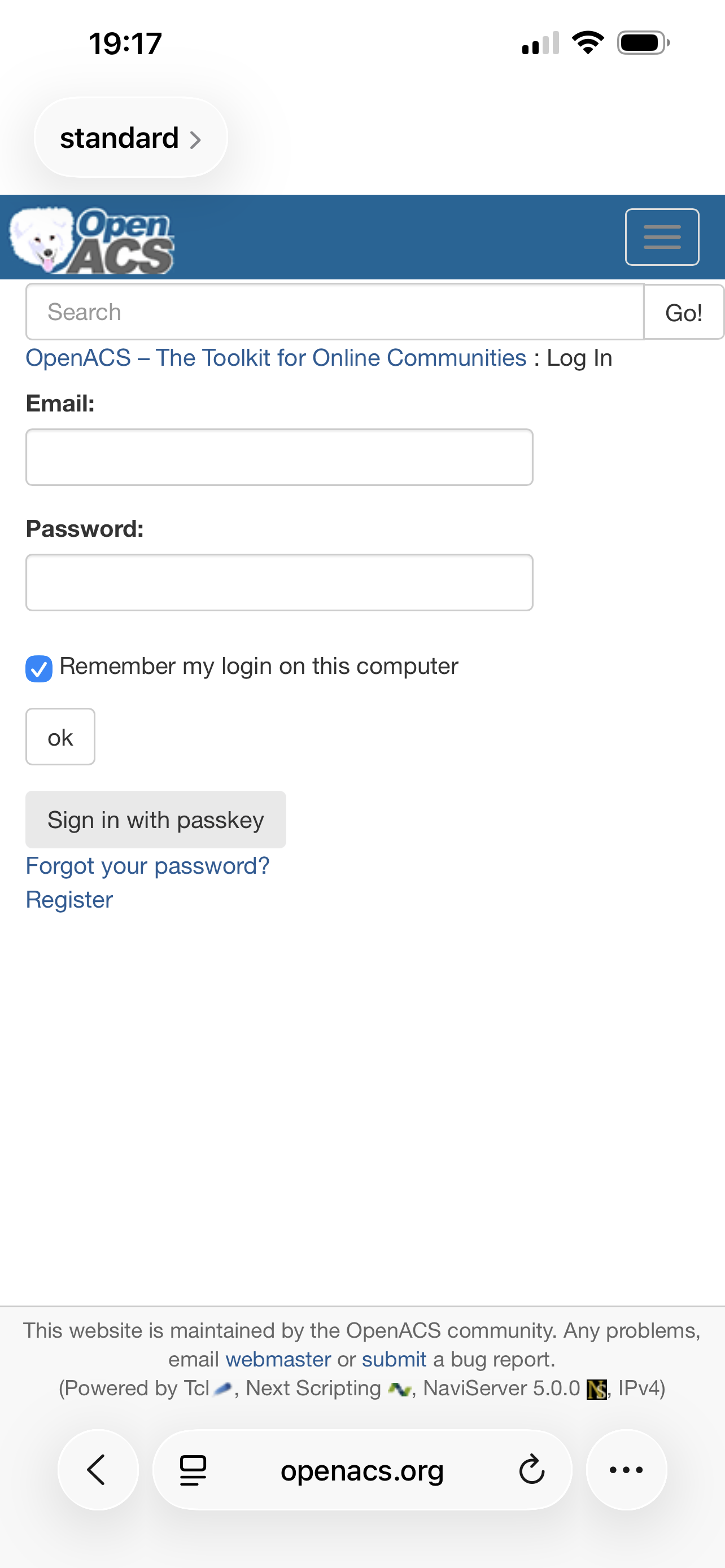
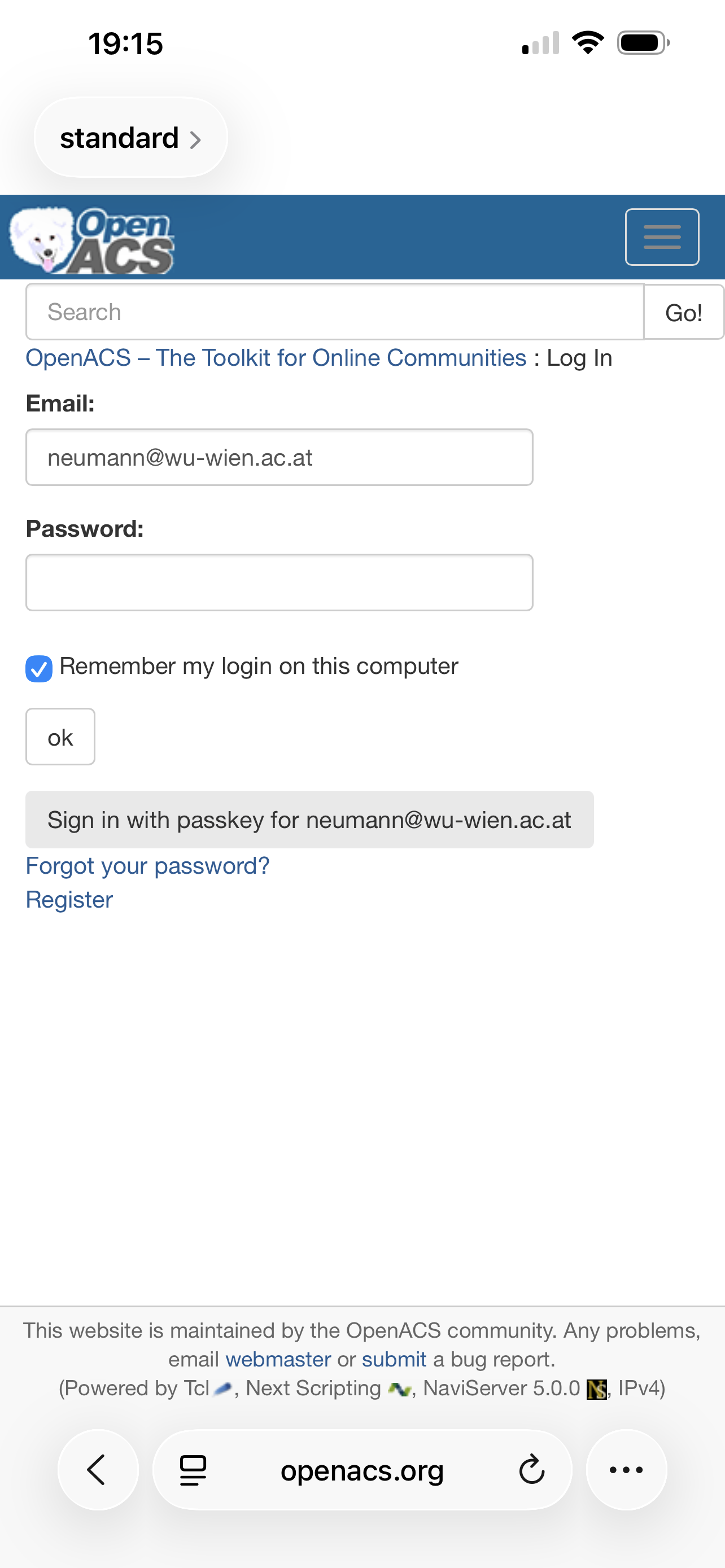
To avoid any doubts I deleted the previously created passkeys and created a new one on my Debian Trixie laptop with Chrome 143.0.7499.192, but at login I still don't see the option to sign in with passkey.

Claudio

Hi Claudio,

The passkey must be created on the same device where you are testing the login, so that it is available to the platform’s credential store on that device.

Could you please confirm that the passkey was created on the same device where you later tried to sign in?

In the current preview, the “Sign in with passkey” option is shown conservatively on the client side and may still be refined based on feedback like yours.

Many thanks for testing! -g

Hi Gustaf,

yes, I created the passkey and then logged in on my laptop, where I can see the passkey's timestamp both on the Google password manager and on my /pvt/Home.

Claudio

Unfortunately, I currently don’t have a Linux client available for testing. From reports, desktop Linux browsers appear to have limited support for passkey discovery: passkeys can be created and stored, but are not always discoverable in a passkey-first login flow.

Passkey discovery requires a platform credential provider (such as iCloud Keychain on Apple platforms or Windows Hello on Windows). Without such a provider, browsers may support passkeys, but cannot reliably offer automatic passkey discovery during login.

The following client platforms are reported to work well with passkey discovery:

- Safari on macOS / iOS
- Chrome on macOS / Windows
- Edge on Windows
- Chrome on Android

This means, testing via mobile devices is much better supported. Do you have any of these to test?

In general, it should be possible to avoid passkey discovery by supporting additionally an identifier-first workflow. The crypto management will be the same, but parameterization and interactions will change. i have to look into the details.
I used my Android 16 and tried with Chrome and Firefox, but the result was the same as before.

Please note that I'm already using passkeys on my smartphone to log into service like Google, Dropbox etc.

Claudio

Hi Claudio,

thanks for testing and reporting this.

I checked the database on openacs.org, and you do have a passkey registered from your Android device (Chrome on Android, reporting as Android 10), so registration itself clearly worked.

What has changed since the earlier tests is the login flow, not the underlying WebAuthn support:

  • We no longer rely on a pure passkey-first approach.
  • Instead, the default is now auto mode, which works as follows:

  • If the login field is empty → try passkey-first (credential discovery).

  • If an email/username is present → use identifier-first (restrict WebAuthn to passkeys registered for that account).

  • If passkey-first is not supported or does not return a credential, the UI asks for the identifier and retries via identifier-first.

This change was necessary because passkey discovery is not reliably supported on all platforms and browser combinations.

On Android, passkey-first should work in principle, but behavior still varies depending on browser, account integration, and platform state. Identifier-first is therefore the robust path that works everywhere.

Could you please try the following once more? Since you have already registered a passkey before, you should see now the "sign-in with passkey" under the login form. Then click “Sign in with passkey”. If no passkey is registered and no ident (on this site the email address) was entered, you will be prompted to provided it.

If this still fails, we can look at the server logs for the exact WebAuthn error returned by the browser.

All the best -g

I just retried on my smartphone, but I got no chance to sign in with passkey.

Claudio

Hi Claudo,

Does this mean, you saw no "sign-in with passkey" button? To reduce the guess-work, i have added a diagnostics page: open on otpnacs.org the page "/webauthn/diagnostics" and clock "send report to server-log", then i should see the relevant details.

Again, many thanks for your help
-g

Hi Gustaf,

I don't see the sign-in with passkeys button. I executed the diagnostica and sent the report to server-log with diag_id=CF2E1BE269683D3E7E9164B079658E979.
I also tried the Test 1 and Test 2, both resulting with:
"ok": true,
"gotAssertion": true,
"id": "LoJx1jYWiyfuPTcJwdx1kA",
"type": "public-key"

Claudio

Thanks for testing and for sending the diagnostics — your report shows that passkeys and conditional mediation are supported and working on your device. I have changed the "display button" logic to be more liberal.

The “Sign in with passkey” button should now appear; if it still does not, please re-run /webauthn/diagnostics (report is further extended) and send me the new diag_id so I can inspect the gating logic on the server side.

The button doesn't appear yet.
I sent the report and the diag_id Is 7103DE6A7F77A045BE2E4CA420BCB9A83

Claudio

Thanks — your diagnostics show WebAuthn works, so this looks like a cached login JavaScript issue (the updated JavaScript file was not fetched from the server). I’ve updated the login page to force a fresh download of passkey-login.js;

Could you please go to the login page again and check whether the “Sign in with passkey” button appears now?

Great! Now it works perfectly.
Many thanks!

Claudio

Dear Claudio,

great to hear — thanks for testing and for your patience!

Part of the issue turned out to be a cached JavaScript file in the browser; after a refresh, things behaved as expected. We’ve also improved the package by adding a Passkey diagnostics link directly next to the passkey management on /pvt/home, so it’s easier to collect useful information if something doesn’t work.

We’re still looking into further improvements around the visibility of the “Sign in with passkey” button, especially on systems without passkey discovery.

Thanks again for helping to shake this out!
-g

Collapse
Posted by Gustaf Neumann on

After the initial feedback, the new code moved away from a pure passkey-first login because it is not reliable across all platforms (notably Linux desktops, and sometimes Android browser combinations).

The current design supports three modes:

1) passkey (passkey-first)

  • Browser is asked to discover a credential without any user identifier.
  • Works well on Apple platforms and often on Android.
  • Fails silently on some platforms (notably Linux desktop browsers).

2) identifier (identifier-first)

  • User enters email/username first.
  • Server restricts WebAuthn to passkeys registered for that account (allowCredentials).
  • Works reliably on all platforms.
  • This is now the robust fallback.

3) auto (default)

  • Decides per click, not per browser:

  • If identifier field is non-empty → identifier-first

  • If identifier field is empty → try passkey-first
  • If passkey-first fails (e.g. no discoverable credentials), the UI prompts the user to enter an identifier and retries via identifier-first.
  • No user-agent sniffing is relied upon anymore.

To sum up, “Passkey-first” works on many devices (Apple, often Android), but is not consistently supported everywhere. Rather than guessing based on browser/OS, the login flow now adapts dynamically and always has a reliable fallback.

I have installed the new version on openacs.org just now. Previously registered passkeys continue to work (no need to register passkeys again). The changes for the different authorization modes were mostly in JS, and a few in tcl (additional arguments, mode handling).

all the best -g