Creating Web Pages
Created by Joel Aufrecht, last modified by Gustaf Neumann 02 May 2020, at 12:58 PM
cp /var/lib/aolserver/$OPENACS_SERVICE_NAME/packages/acs-core-docs/www/files/note-procs.tcl /var/lib/aolserver/$OPENACS_SERVICE_NAME/packages/myfirstpackage/tcl/
To make this file take effect, go to the APM and choose "Reload changed" for "MyFirstPackage".
Our package will have two visible pages. The first shows a list of all objects; the second shows a single object in view or edit mode, and can also be used to add an object. The index page will display the list, but since we might reuse the list later, we'll put it in a seperate file and include it on the index page.
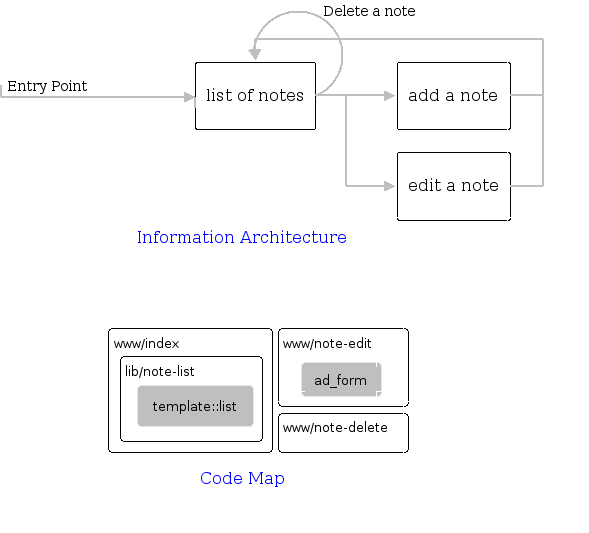
Each user-visible page in your package has, typically,
three parts. The tcl file
holds the procedural logic for the page, including TCL and
database-independent SQL code, and does things like
check permissions, invoke the database queries, and modify
variables, and the adp page
holds html. The -postgres.xql
and -oracle.xql files contains
database-specific SQL. The default page in any directory is
index, so we'll build that
first, starting with the tcl file:
[$OPENACS_SERVICE_NAME postgresql]$cd /var/lib/aolserver/$OPENACS_SERVICE_NAME/packages/myfirstpackages/www[$OPENACS_SERVICE_NAME www]$emacs index.tcl
Paste this into the file.
ad_page_contract {
    This is the main page for the package.  It displays all of the Notes and provides links to edit them and to create new Notes.

    @author Your Name (you@example.com)
    @cvs-id $Id: tutorial-pages.html,v 1.37 2006/07/17 05:38:32 torbenb Exp $
}

set page_title [ad_conn instance_name]
set context [list]
Now index.adp:
<master>
  <property name="title">@page_title;noquote@</property>
  <property name="context">@context;noquote@</property>
<include src="/packages/myfirstpackage/lib/note-list">
You can test your work by viewing the page /myfirstpackage on your installation.
The index page includes the list page, which we put in /lib instead of /www to designate that it's available for reuse by other packages.
[$OPENACS_SERVICE_NAME www]$mkdir /var/lib/aolserver/$OPENACS_SERVICE_NAME/packages/myfirstpackage/lib[$OPENACS_SERVICE_NAME www]$cd /var/lib/aolserver/$OPENACS_SERVICE_NAME/packages/myfirstpackage/lib[$OPENACS_SERVICE_NAME lib]$emacs note-list.tcl
template::list::create \
    -name notes \
    -multirow notes \
    -actions { "Add a Note" note-edit} \
    -elements {
	edit {
	    link_url_col edit_url
	    display_template {
		<img src="/resources/acs-subsite/Edit16.gif" width="16" height="16" border="0">
	    }
	    sub_class narrow
	}
	title {
	    label "Title"
	}
	delete {
	    link_url_col delete_url
	    display_template {
		<img src="/resources/acs-subsite/Delete16.gif" width="16" height="16" border="0">
	    }
	    sub_class narrow
	}
    }

db_multirow \
    -extend {
	edit_url
	delete_url
    } notes notes_select {
	select ci.item_id,
	       n.title
        from   cr_items ci,
               mfp_notesx n
        where  n.revision_id = ci.live_revision
    } {
	set edit_url [export_vars -base "note-edit" {item_id}]
	set delete_url [export_vars -base "note-delete" {item_id}]
    }
[$OPENACS_SERVICE_NAME lib]$ emacs note-list.adp
<listtemplate name="notes"></listtemplate>
Create the add/edit page. If note_id is passed in, it display that note, and can change to edit mode if appropriate. Otherwise, it presents a form for adding notes.
[$OPENACS_SERVICE_NAME lib]$cd /var/lib/aolserver/$OPENACS_SERVICE_NAME/packages/myfirstpackage/www[$OPENACS_SERVICE_NAME www]$emacs note-edit.tcl
ad_page_contract {
    This is the view-edit page for notes.

    @author Your Name (you@example.com)
    @cvs-id $Id: tutorial-pages.html,v 1.37 2006/07/17 05:38:32 torbenb Exp $

    @param item_id If present, assume we are editing that note.  Otherwise, we are creating a new note.
} {
    item_id:integer,optional
}

ad_form -name note -form {
    {item_id:key}
    {title:text {label Title}}
} -new_request {
    auth::require_login
    permission::require_permission -object_id [ad_conn package_id] -privilege create
    set page_title "Add a Note"
    set context [list $page_title]
} -edit_request {
    auth::require_login
    permission::require_write_permission -object_id $item_id
    mfp::note::get \
	-item_id $item_id \
	-array note_array

    set title $note_array(title)

    set page_title "Edit a Note"
    set context [list $page_title]
} -new_data {
    mfp::note::add \
	-title $title
} -edit_data {
    mfp::note::edit \
	-item_id $item_id \
	-title $title
} -after_submit {
    ad_returnredirect "."
    ad_script_abort
}
[$OPENACS_SERVICE_NAME www]$ emacs note-edit.adp
<master>
  <property name="title">@page_title;noquote@</property>
  <property name="context">@context;noquote@</property>
  <property name="focus">note.title</property>

<formtemplate id="note"></formtemplate>
And the delete page. Since it has no UI, there is only a tcl page, and no adp page.
[$OPENACS_SERVICE_NAME www]$ emacs note-delete.tcl
ad_page_contract {
    This deletes a note

    @author Your Name (you@example.com)
    @cvs-id $Id: tutorial-pages.html,v 1.37 2006/07/17 05:38:32 torbenb Exp $

    @param item_id The item_id of the note to delete
} {
    item_id:integer
}

permission::require_write_permission -object_id $item_id
set title [item::get_title $item_id]
mfp::note::delete -item_id $item_id

ad_returnredirect "."
# stop running this code, since we're redirecting
abort