Showing 71 - 80 of 694 Postings (
summary)
Created by Robert Taylor, last modified by Gustaf Neumann 01 May 2020, at 11:36 AM
One stormy night I was bored ... and this was born:
1. Some links to other design work ideas:
a) http://www.thedesignexperience.org/openacs/oacs-design-hack.png
b) http://www.thedesignexperience.org/openacs/?=
c) http://www.thedesignexperience.org/openacs/image-library
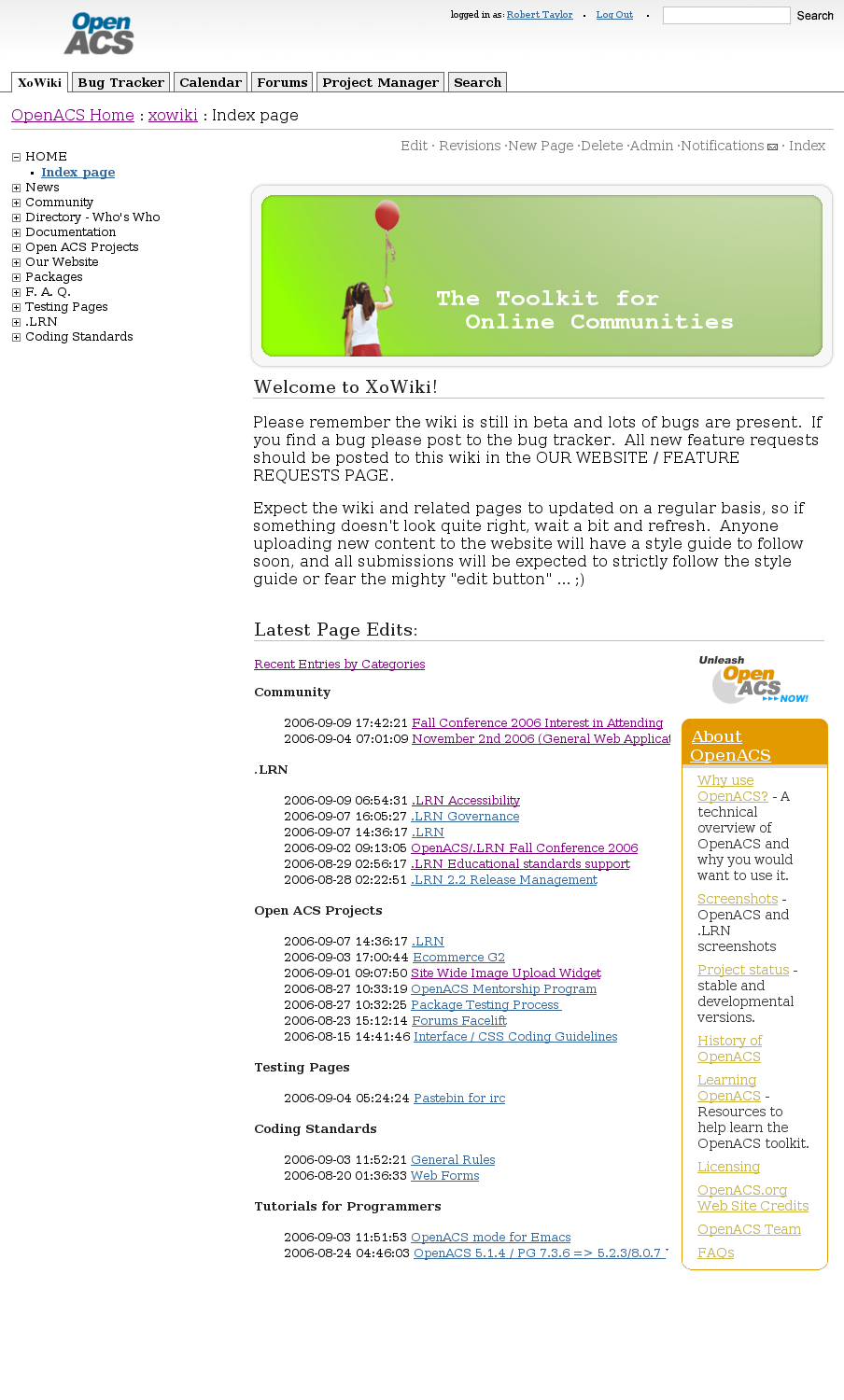
2. I was playing around with a screenshot of openacs.org the other night and I wanted to see what the site would look like with the following criteria:
a) REUSE all standard OACS components. No funky layouts, no funky font work, just standard OACS out of the box layout and components.
b) SIMPLIFY the design. Don't change anything, just remove the unnecessary design components already present. We should NOT get caught up in a multimonth redesign sessions that takes forever to implement. Modify what we have and make it look unified.
c) Consider the UTILITY factor of the website. I don't want to think about the website as a 'special use case' of our toolkit. I would like to re-use our own tools as much as possible. Out of the box the site would default to XoWiki for the content management, we would have the bt, cal and forums tabs as normal. I was playing around with having a PM (pm needs some cleanup) and SEARCH tabs for advanced search and for project managing oacs based activities by those of us that want to use that tool.
3. The oacs logo was stripped of the alex graphic. It was kinda goofy and I'm going to try to work on something and see what I come up with. Maybe we can holda contest for the logo ... the joomla team ended up with a pretty cool logo as a result.
4. I will create a sample site layout here and make it available online live for evaluations by everyone.
5. Here is the sample i was playing around with:
Created by Ryan Gallimore, last modified by Gustaf Neumann 01 May 2020, at 11:36 AM
OpenACS has a proven suite of collaboration tools that are in current use by nonprofits, educational institutions and commercial companies worldwide. Internationalization (I18n) is currently being completed by Heidelberg University. Building on the strength of OpenACS, this project can focus on making the tools work effectively for NGOs rather than tool creation. New features or feature enhancement will be developed when needed, but emphasis will be placed on using existing code and resources.
This project will customize the user interface and information architecture of existing OpenACS functionality to support multi-national grassroots communication. It will also create an easy to install version of OpenACS based on these customizations. Combined with enhanced and specific documentation it will make a very sophisticated multi-lingual community system available and accessible to XXX and other NGOs alike. Finally, the project will also create educational marketing material aimed at multi-national grassroots NGOs to make them aware of this new resource.
On-line collaboration typically uses a variety of tools. A well-constructed application uses them efficiently. The figure below was created for marketing purpose to educational institutions; nonetheless it is a good image for understanding existing and planned OpenACS functionalities.
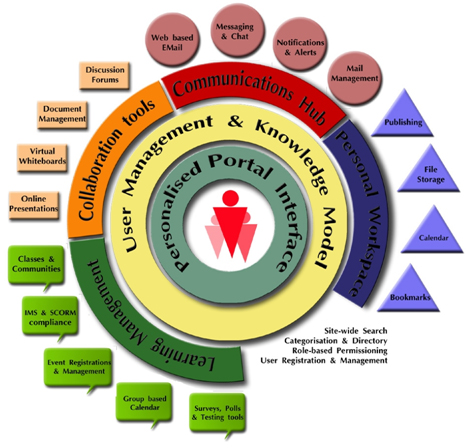
Modularity is wonderful for quickly assembling exactly the application you need. Maintainability is enhanced in OpenACS when similar modules share the same basic functionality. Thus, from a more technical perspective OpenACS is a layered architecture with many packages that provide diverse functionality to end users; it relies on common underlying structural packages such as the content repository, notifications, date-time space, authentication, and context search. This structured approach allows the easy creation of specialized, yet unified, new functionality with a minimum of separate and new code.
OpenACS traces its roots back to Philip Greenspun, a Computer Science Professor at MIT, and his work on Photo.net starting in 1995 and Philip and Alex’s Guide to Web Publishing in 1998. The code base has always emphasized collaboration and management of geographically diverse online communities. The underlying engineering was supported by millions of dollars of venture capital spent on hiring PhDs in Computer Science from MIT, CalTech and other major universities across the Atlantic.
OpenACS has proven its durability and utility by surviving the death of its parent company (ArsDigita) to grow into a vibrant grassroots collection of independent consultants and small companies implementing diverse and complex web solutions around the globe for fun, philanthropy, and profit.
dotLRN is an application built on top of OpenACS specifically targeted for universities. A consortium lead by the Sloan School of Management at MIT and Heidelberg University has significantly improved enhanced OpenACS. In many ways this project will be philosophically modeled after dotLRN. It will create an application built on top of OpenACS that is specifically targeted to NGOs needing web based community tools in a multi-lingual environment.
This project will also build directly upon functionality implemented by dotLRN. Especially important for this project is the strong emphasis on groups, subgroups and distributed administration. In Learning Management Systems (LMS) it is very important that instructors have extensive control over membership, content and presentation. Designated XXX leaders will reuse this functionality extensively to allow the project to have self-managing geographically diverse and common-interest groups and subgroups that can be managed locally without extensive time commitment from the parent organization.
One goal of this project is to deliver a code base that has significant overlap with dotLRN. This is desirable from a sustainability and maintenance point of view because enhancements and bug fixes made to the dotLRN community will be available to the NGO community as well. OpenACS’ layered package system is designed to support this type of code reuse and make it possible to have specialized code easily segregated from customized code for enhanced maintainability.
Case studies on dotLRN can be found at: https://dotlrn.org/users/cases
OpenACS is continually being improved, often in ways that will be useful to nonprofits and NGOs. Currently there is active development of the following features.
- E-Commerce G2
- Xowiki
- dotLrn
Although many of these features will not be immediately used in the XXX site, they will be vital for the future sustainability and expandability of this project, giving the project the ability to be quickly extended to meet the needs of a multitude of NGOs.
The product produced will be a custom installation of OpenACS that any OpenACS company or developer would be able to support. Currently, there are consultants and companies that provide support for OpenACS in the following countries: Australia, Belgium, Brazil, Canada Denmark, Finland, Germany, Guatemala, India, Israel, Italy, Netherlands, Norway, Philippines, Spain, Sweden, Switzerland, UK, US,.
OpenACS has strong and continuing support of standards that will enable this project and future extensions to share content and interoperate with other systems.
The Simple Object Access Protocol (SOAP) web services – a way to create widely distributed, complex applications that run over the Internet, has already been incorporated into some OpenACS packages and research is underway at the University of Sydney into further uses of Web Services.
OpenACS also includes a RSS Support Design Module to support the RDF Site Summary (RSS), an XML-based, lightweight multipurpose extensible metadata description and syndication format. RSS support positions OpenACS for future functionality requiring accepting and distributing syndicated news feeds and other RSS-compliant content.
The OpenACS WAP module supports the wireless access protocol (WAP), thus allowing easy deliver of content to WAP-enabled devices such as cell phones, PDAs, etc., as well as regular desktop browsers. In fact, the simplicity of the OpenACS interface means it is well suited for use on mobile clients.
OpenACS and its dotLRN consortium are committed to implementing the Sharable Content Object Reference Model (SCORM), Instructional Management System (IMS) and Open Knowledge Initiative (OKI) standards, all among the most widely used standards for learning object interoperability.
Created by Robert Taylor, last modified by Gustaf Neumann 01 May 2020, at 11:33 AM
Topic:
How to configure a Network Place under Windows XP to access a WebDAV folder in file storage.
Overview:
Creating a Network Place will allow you to drag and drop multiple files and even folders from your machine to your OpenACS or .LRN website. Once you have done these eleven (arguably ten) simple (really!) steps to create a permanent connection on your computer to your file storage location. The Network Place will be accessible through My Network Places.
Once you have established a Network Place to your File Storage documents, you can transfer multiple files, create/delete/edit folders, delete files. Creating and modifying files and folders through the Network Place is the same as you would do using Explorer. You can also open, edit and save files without the hassle of downloading, saving and uploading them on your machine!
Instructions:
 |
Step 1: To create a Network Place, open Windows Explorer.
Then, right click on "My Network Places" and select Open.
|
 |
Step 2: Under Network Tasks, Select "Add a Network Place."
|
 |
Step 3: Click "Next" to start the Wizard.
|
 |
Step 4: Highlight "Choose Another Network Location" (if it is not already) and click "Next."
|
|


|
Step 5: Copy the WebDAV URL listed in the file storage folder you want to access and paste it in as the "Internet or Network Address" for your connection.
|
 |
Step 6: Select "Yes" when you are prompted with the Security Alert dialog.
|

|
Step 7: Enter the email address you use to log into the site (or username if your site uses usernames) and password in the "Connect to:" dialog box. This establishes your connection to the Network Place.
|
 |
Step 8: Create a name for the new Network Place or accept the default and then click "Next."
|
 |
Step 9: Leave "Open this network place when I click Finish" checked.
Click "Finish" to complete the Wizard.
|
| |
Step 10: The first time you do this, you may be prompted again with the Security alert and a login screen. Please say "Yes" to the alert.
|
|
Step 11: You may also need to login again using your site email address and password. (This is a Microsoft thing, not a bug and we can't do anything about it.)
|
 |
Voila! Your new Network Place will open and you will see the folders as they appear in file-storage on your site. You can now open Explorer and select, drag and drop multiple files or folders from your machine into SloanSpace. After you do this, refresh your browser to see the files/folders.
The Network Place is permanent, so you only need to set it up once and reconnect to it when you need to (through My Network Places.
|
Created by Emmanuelle Raffenne, last modified by Gustaf Neumann 01 May 2020, at 11:20 AM
Package Specification Summary for Package: calendar
Bug Tracker Summary for Package: calendar
Code Metrics Summary for Package: calendar
| # Tcl Procs |
55 |
| # Tcl Lines |
1604 |
| # Tcl Blank Lines |
270 |
| # Tcl Comment Lines |
170 |
| # Automated Tests |
6 |
| # Stored Procedures |
PG: 10 ORA: 12 |
| # SQL Lines |
PG: 849 (blank 127 comments 139)
ORA: 914 (blank 144 comments 160) |
| # ADP pages |
18 |
| # ADP lines |
655 |
| # Include pages (calendar/lib/) |
0 |
| # Documentation pages |
3
(Package Documentation)
|
| # Documentation lines |
664 |
| Browse Source |
API-browser |
| Github Repository: |
https://github.com/openacs/calendar/tree/oacs-5-10
|
Suggestions for improvement (from /forums/message-view?message_id=432244 ):
- different colors for different calendar sources
- easy and nice printout of week and monthly calendar
- Possibility to link one calendar item to many classes or community on creation or editing
- Attach files
- Change of repeating events after creation (if you have a different repeating sequence there is no way of changing the sequence)
- Site-wide calendar for holidays
- Department-wide calendars.
Sync contacts with contact managers, palm pda's etc.
Note I see a small potential issue. Within one calendar it makes sense to color code by calendar types. When using dotLRN or otherwise aggregating calendars it makes sense to color code by calendar_id (source). It probably never makes sense to do it both ways on the same site. We may need to think this through.
Text taken from Dirk document (2004)
Maintained by Dirk Gomez - last change on 22-Jan-2004.
I am tracking my work on calendar here. Please get in touch with me if you have comments.
Features Completed
- Separated code and presentation
- Notifications
- Removed unused or duplicated code and database queries.
- Proper use of OpenACS permissioning.
Features I am working on currently
- Code clean up
- Documentation of the data model
- CSS/XHTML
Features I will be working on
- The calendar view templates take a lot of parameters some of which require knowledge of the inner workings of the respective template: e. g. currently the calling templates passes in a url_template which determines whether an action on a particular item can be executed. I'll move this to being proper and understandable parameters like create_p or edit_p.
- New parameter Collaborative Calendar: a parameter that allows every user of a community to add, edit, and delete events if set to true.
- New parameter in DotLrn: parametrize whether to show calendar lists for a whole term.
- Allow users to store calendar preferences for example the user default view. The calendar_preferences table already exists, yet isn't used at all.
- Add a toggle: "Show all my events/Only this package's or community's events"
- Use a site-wide categories package to do away with the calendar types and the multiple calendars per package.
- Reminder - make it possible that a user sets a particular time on a calendar item to receive a reminder email
- Multi-day events
- iCal format compatible. Ideally, import/export to Outlook/iCalendar/etc.. via iCal format (by Jade)
- Ability to map any sort of date information in a database to the calendar, this means tickets, bugs, etc. perhaps via a service contract (by Jade)
- There should be any easy UI for specifying what is shown. Both the user and the admin should be able to select these things (the admin sets the range of what is possible, the user can select from those choices) (by Jade)
- Events should be able to span more than a day. Ideally, the UI for this should look good. (by Jade)
- An ability to be able to add data via the calendar as well. Anything that implements the service contract should allow you +to add information on that date as well. For example, add a ticket due that day, or add an event for that day, etc.. (by Jade)
- The calendar needs to be printable (at least for where I work - Jade)
- Desktop and Handheld support - cross-browser and cross-platform compatible (ryan-g2)
- Filters by calendar, keyword, object (e.g. Show all bug deadlines)
- Public event submission (unauthenticated) approved by an admin (ryan-g2)
- Invite people to events (ryan-g2)
- auto-book invitees if preference enabled, otherwise, require confirmation
- if there is a conflict among registered users' schedules, the systems suggests possible times to the inviter.
- people external to the system can be invited.
- Resource Scheduling - Booking (ryan-g2)
- Schedule one resource (room, car, laptop) per calendar
- Non-simultaneous booking (no overlapping times)
- Book an item: suggest alternate times across multiple calendars if asset is unavailable. Example: 5 Smart Cars for rent each have their own calendar; if all are booked from 10 - 11 AM, suggest 9-10 or 11-12 across all calendars.
- Optional bill for booked time (connect with ecommerce module)
Data Model Suggestions
Don:
Calendar items should map arbitrary objects (perhaps only content items) to a given calendar and given acs-events. We shouldn't have to derive special types from cal item type in order to attach it to a calendar (nor should we have to duplicate content to attach it to two calendars as we do now) If we restricted the mapping to content items (i.e. calendar info some sort of content type) we could use the CR's ability to map a template to a given content type or item to make it possible for the calendar package to display calendar item details using that facility, giving the package adding something to the calendar control over how it is displayed. Much more general.
ryan-g2:
Is it possible to optionally link any acs_object to an acs_event object (event)? Examples:
- People attached to a meeting event
- Bug item attached to a deadline
- Location attached to a meeting event [google maps integration]
- Project item attached to a deadline
- Simple time and description (for booking an asset) -- unattached to an object
- Multiple objects: Rent a car C from Time A to Time B and pick it up at Location L (Event linked to two objects C and L). See zipcar.com
From above: "Use a site-wide categories package to do away with the calendar types and the multiple calendars per package."
Features I started work on
I'm listing stuff here on which I am already working, but whose completion is nowhere near finished and there is not even an estimation when it may be finished.
- Integrate libical into AOLserver
- Lift as much as possible from Brandeis' Calendar, see this forum thread
Interesting Links
Notes
June 12, 2006 - Solution Grove worked on an AJAX calendar month view that has colors by calendar_types, has mouse overs for item details for each date, and changes months without refreshing the pages. They hope to contribute it at some point. Contact Caroline or Hamilton from Solution Grove if you need an advanced copy.
Created by Rocael Hernández Rizzardini, last modified by Gustaf Neumann 18 Jan 2020, at 10:54 AM
- Avoid putting in Tcl code on ADP pages if possible
Although AOLserver/NaviServer ADP supports placing Tcl codes directing into ADP pages, one should used the ADP system wherever possible (see e.g. Using Templates in OpenACS or OpenACS Templating System).
- Quote in the master, pass "properties" literally from slave adp files
when variables are used in templates without modifiers (marked with a ";") then the values of the variables are internationalized and html-quoted. The substitutions should be done at the place, where the variables are actually used, which is for "properties" in the master templates. That the places, where the variable values are just passed on, the modifier ";literal" should be used to prevent quoting and internationalization.
Master:
   <head>
   <title>@doc.title@</title>
   </head>
   <body bgcolor="#ffffff">
   <h1>@heading@</h1>
   <slave>
   </body>
Slave:
   <master>
   <property name="doc(title)">@title;literal@</property>
   <property name="heading">@title;literal@</property>
   ...
Passing arguments to ADP includes:
<include src="name-of-included-adp" ... var="@value;literal@" ...>
or one can pass variables via reference to the include
<include src="name-of-included-adp" ... &="varName" ...>
- Pass always the "context" and "doc(title)" properties to the site master template
Example:
   <property name="doc(title)">@title;literal@</property>
   <property name="context">@context;literal@</property>
- Quote HTML attributes
Quoting HTML attribute values improves the safety against XSS attacks, especially when the attribute values are variables. Double quotes are preferred over single quotes, both are fine.
-
Common doc properties
The following doc properties are used in the blank-master template:
- doc(title): Title of the document
- doc(lang): Language of the document
- doc(type): HTML doc type declaration
- doc(base_href): The base URL to be used throughout the document for relative URLs (see base element)
- doc(base_target): A keyword or author-defined name of the default browsing context to display the result when links or forms cause navigation, for <a> or <form> elements without an explicit target attribute. (see base element)
Created by OpenACS community, last modified by Gustaf Neumann 06 Oct 2019, at 12:54 PM
Current topic: What approach should we use to upgrade the documentation?
Here are some recent approaches expressed in one form or another for managing the documentation in the context of "the plan":
Approach 0. Why not use docbook, which was the previous way documentation was being handled?
- docbook is open-source.
- A growing community surrounds DocBook (has mailing lists)
- A number of free and commercial tools are available for editing and publishing DocBook documents.
- docbook enables us to publish in a variety of formats.
- XML separates content from presentation: It relieves each contributor of the burden of presentation, freeing each writer to focus on content and sharing knowledge.
- docbook is well tested technology. It has been in development since the early 1990's).
problems: In 2002, Docbook still was not fully capable of representing online books as practiced by book publishers and expected from readers with regards to usability on the web. That meant DocBook did not entirely meet OpenACS publishing requirements at that time.
In 2004, Docbook released version 4.2, which complies with all the OpenACS publishing requirements. Producing a web friendly book hierarchy arguably remains DocBooks' weakest point. For example, a dynamically built document should be able to extract details of a specific reference from a bibliographic (table) and present a footnote at the point where referenced. DocBook 4.2 allows for this with bibliocoverage, bibliorelation, and bibliosource. Yet, OpenACS documentation does not follow a standard book hierarchy since most of the documentation was written before version 4.2, and re-organizing it in docbook source would be challenging.
Other problems with using docbook:
- Only developers can make changes, which makes it difficult for the rest of the community to coordinate changes and updates, especially when they are seemingly small (such as typos).
- OpenACS docbook has long documents, which puts extra stress on using consistent style to separate topics on the same page. For example, readers get confused when trying to follow the installation documents. Some instructions get missed, other instructions are done when they shouldn't have been.
- OpenACS docbook uses multiple tags for the same function and requires only certain tags to be used in certain contexts. The documentation in HTML is convoluted and displays inconsistent.
Based on the other recent suggestions, there seems to be a general consensus to move away from docbook, but perhaps keep the docbook organization.
Robert writes:
- First: ..attempt to take the rest of Documentation over to XoWiki..
- Secondly: ..try to setup an automated versioning system. We should end up with categories such as 5.2 Documentation, 5.3 Documentation, HEAD Documentation, etc. My current thinking is that we can work on HEAD category of documentation, once 5.3 is release it becomes categorized as such and a copy of the docs gets created and re-categorized as HEAD once again. This should allow versioning and easy upgrades/editing of docs (well easy may not be the right word, docs are a lot of work)
Robert, "Secondly" is how versioning has been accomplished using docbook. This method seems to work fine, and we can do it with xowiki docs by creating a set of static pages from the xowiki ones. --Torben
Approach 2
Robert writes:
Documentation: [move] ..the rest of the documents to XoWiki. The idea would be to have categorized documents. We would start by moving the 5.2 docs over and expanding on them. When 5.3 is release we would do an automated copy/paste of the 5.2 docs, re-categorize as 5.3 and start the editing process. This is just preliminary thinking at this point..
Robert, everyone seems to have their own way of slicing and dicing docs into categories. We ought to use the existing documentation requirements to guide how the documents are organized, and then they can be categorized any number of ways since multiple categories can be applied to each page. --Torben
Approach 3 (and previously 5). Refactoring original docbook docs en:New_Documentation_Process
STAGE A: CONVERT DOCUMENTATION TO XOWIKI (note: all api docs remain the same) Step #1. Catalog the current documentation.
(Malte writes) ..modify the script Gustaf provided to import the whole documentation in one go into a new XoWiki instance with the structure (page_order) that has been added in XoWiki 0.42 taken from the chapters of the documentation so that we do have an exact mirror of the documentation as it stands now. [Done, see https://openacs.org/test-doc].
Malte, why would we want an exact mirror of something that is not organized well.. too many topics per page and pages inconsistently presented.. requires a new reader to jump around to get familiarized with material. etc etc? Why not copy the docbook contents into a cleaner outline and work from there (as in approach 3 above)? --Torben
Torben, the /doc section is organized. That you do not like it is obvious and we could rework it later, but until we have the resource to rewrite the whole documentation, it makes much more sense to improve the documentation we have instead of putting it into the graveyard. And we need to come to terms. This discussion does not yield any results at the moment but keep us from doing the actual work: Improving the documentation -- Malte
[Then] ..assign categories to the documentation, allowing for an alternative view on the documents (so you could say "instead of showing the whole documentation only show the documents for a specific category"). Probably this needs some more detailed discussion with Gustaf finding out how this could be achieved in XoWIKI and what would make most sense. Ideally we could provide a different structure based on the target group (e.g. category) but this is probably shooting too far. Getting categorization and page ordering in a decent shape should provide us a lot of possibilities..
Malte, have you seen docs-admin-toc , docs-end-user-toc and docs-eng? These are outlines of existing pages in XoWiki that represent a revised version of the Table of Contents (TOC) in the docbook version. Feel free to propose new pages there for us to fill in content. --Torben
Yes I have seen them. Do they resemble a book in any way to you? They are alternative structures, indeed, but you can impose them on a book view as well, any time. A book is what we need, something people can go to and start reading. If the book starts with four different pages, each outlining a different reading path, even the better. But a book it should be nevertheless, because this is how people still learn. If you do not like the book approach, that is fine, then we should open this question up for a TIP. My main goal at the moment is to finally get this done and start working. And I want to get rid of the myriads of confusing advise given at openacs.org. I have someone to work with me on that in the next two months and I want to have a clear way to go forward. So I will just TIP this. -- Malte
See also: en:wikidoc-notice
This approach was originally posted at en:Documentation_Project. It was moved here as the topic expanded.
..port docbook pages to xowiki manually.. look at each part in detail.. separate to subsystems and how they are used (context). Why?
"..the human mind can only deal with a relatively small number of independent pieces of data at one time, but if data are chunked together in appropriate ways, the mind can perform higher order abstractions, and these in turn can be chunked together, with successive abstractions, until an entire complex situation is encompassed. The systems approach addresses this property of the human mind by providing strategies for the data gathering, chunking, and abstracting process." George G. Lendaris, On Systemness and the Problem Solver: Tutorial comments 1983.
A short video on how the mind deal best with large amounts of information by "chunking": The Science of Thinking
This work is in progress, with root documentation page here: en:openacs-handbook
A systems strategy of multiple perspectives has these rules:
- Each xowiki page discusses a single topic.
- Topics are linked together by any number of other xowiki pages to present an ordered presentation of the topics with a common thread/topic connecting them. For example, en:openacs-system-install is a page that links together the topics of installing the component software of OpenACS. Similarly, each component software, such as en:aolserver, has its own view of some overlapping topics.
Multiple perspectives meets these significant documentation requirements:
- helps identify subsystems and how OpenACS works --becomes a natural tutorial without more words.
- reduces the burden of keeping documentation up to date since there is only one place to put relevant information for a particular topic --no redundancy
- pages are not organized by a dominant category morphology that tends to address the perspectives of just a few people. Most any perspective can be represented.
- Readers do not have to filter out a bunch of information that is irrelevant to them or their task at hand.
Move all but maybe the first and last 2 items from https://openacs.org/doc/dev-guide.html to https://openacs.org/doc/acs-kernel/ (and what ever else is relevant to kernel only); and move the first item to https://openacs.org/doc/acs-admin etc. That way the core docs are presented in a consistent context with the other packages. Also, do not migrate these docs around as a package is designated part of the core (or subsequently removed from it). This would help developers see appropriate context (and meets one of the documentation requirements).
Allow documentation to link directly to the api-docs, to reduce redundancy and links go to current, local API docs. In other words, https://openacs.org/api-doc/package-view?version_id=358136 becomes: /api-doc/index?about_package_key=acs-datetime The feature has been added to OpenACS 5.3 so will be released soon.[DONE]
Move Administrator's Guide to the xowiki [in progress, see en:docs-admin and en:docs-admin-toc ], because this section:
- has the most duplicated work (topics overlap on various pages). For example, more than one page explains how to add a package, how to restart the server, how to start the server etc.
- needs to be updated most frequently because of changing installation requirements. For example, PostgreSQL requires different instructions for different revisions, external links change sporadically etc.
Incorporate the work already done in the first wiki ( https://openacs.org/wiki ), where volunteers have already added a wealth of new documentation. Note that some of this will already exist in xowiki from previous importing of docs etc. [TO DO]
We need to get rid of the myriads of different installation instructions. First of all they are not kept up to date (all of them). -- Malte
Created by Carl Robert Blesius, last modified by Gustaf Neumann 26 Sep 2019, at 08:36 PM
- Accessible and semantic layout/design (first priority)
- Layout for screen reader readability
- Consistent CSS for all packages with inheritance where possible
- Package specific CSS only where absolutely necessary
- Remove as many images as possible
- Totally simplified CSS scheme
- Consistent deprecation
- Support for 4 font sizes without UI breakup
- File path re-factoring so designers can easily skin a local installation and upload zip file with local styles for sharing accross installations
- A theme page that includes as many existing adp chunks and form templates as possible.
- Theme manager that allows a designer to upload a css file and immediately test it against the theme page.
- One style for screen, one for print, and one for mobile
Discussion
0. Why not OpenACS Zen? I think this needs to apply across the toolkit for any package, not just .LRN ones, or there will forever be problems as new applications come out for OpenACS, and are later adopted for .LRN. DaveB, we are going to start with .LRN b/c it contains a limited number of packages and also because there is an accessibility push in the project. A big portion of this will also be defining best practices. CarlB
1. I agree with Carl. I have been working through some of this on our own generic OpenACS installs here but would love to co-ordinate with others. Robert.
2. I also will help out. I have several tools available and will look at what is redundant and post soon. Jon Griffin
3. Please consider expanding the scope of the guidelines to include OpenACS and similar efforts underway at Interface / CSS Coding Guidelines. Accessibility etc. is important for the entire toolkit and long overdue. -Torben
Created by Ryan Gallimore, last modified by Gustaf Neumann 26 Sep 2019, at 08:34 PM
not to be confused with messages
Preliminary Specs for private-messaging package
Send a message or invite any online user from a textbox located at the top of every screen.
- User/Subsite Group selection widget.
- AJAX filter-as-you-type search "Smart Search"
- Confirmation for sending to entire subsite group.
- Message textbox
- Audio alert upon incoming message
"User is now online" messages.
- Incoming messages field with history (dropdown window)
- Send message to new online user via a link in history window
Users can block unwanted users or ignore all messages.
- "Block User" button
- "Unblock User" button
- "Ignore all messages"
- "Accept all messages" (except those from blocked users)
Created by Ryan Gallimore, last modified by Gustaf Neumann 26 Sep 2019, at 08:27 PM
As root:
OPENACS_SERVICE_NAME=service1 # Name your service
export $OPENACS_SERVICE_NAME
groupadd web
useradd -g web $OPENACS_SERVICE_NAME mkdir /var/lib/aolserver
cd /var/lib/aolserver
# Download latest tarball:
>> wget [URL to latest tarball]
>> tar xzvf [tarball.tar.gz]
>> mv [tarball_dir] $OPENACS_SERVICE_NAME
# OR, checkout from CVS. Replace oacs-5-4 with the branch of your choice.
>> cvs -d:pserver:anonymous@cvs.openacs.org/cvsroot checkout -r oacs-5-4 acs-core
>> mv openacs-4 $OPENACS_SERVICE_NAME
chown -R $OPENACS_SERVICE_NAME.web /var/lib/aolserver/$OPENACS_SERVICE_NAME chmod -R 770 /var/lib/aolserver/$OPENACS_SERVICE_NAME
# PostgreSQL 8.x
service postgresql stop yum -y remove postgresql # Download the PG rpm
# Initialize the Cluster
service postgresql initdb
# Start the service
service postgresql start
# Start pg on boot
chkconfig postgresql on
# Change postgresql.conf
# AOLServer
Try the AOLServer 4.5 page. The archive download works well
(but uses sources from 2006).
# Daemontools should now be installed, so let's set it up to start, stop and restart AOLServer
cd /service
ln -s /var/lib/aolserver/$OPENACS_SERVICE_NAME/etc/daemontools $OPENACS_SERVICE_NAME
# Daemontools will no scan the etc/daemontools directory and find the run script.
Read this for more information on Daemontools commands
# Modify the etc/daemontools/run script for your ip, user and group. Note the -b IP:PORT flag that # must be added for privileged ports.
# Modify etc/config.tcl to match your hostname and IP. aolserver director should be /usr/local/aolserver
# avoid pid not found errors in the log
 chown -R $OPENACS_SERVICE_NAME.web /usr/local/aolserver/log

 chmod -R 775 /usr/local/aolserver/log
# Start the server!
svc -u /service/$OPENACS_SERVICE_NAME
# Watch the log for errors:
tail -f /var/lib/aolserver/$OPENACS_SERVICE_NAME/log/error.log
If successful, call up the site URL and install the data model.
# Done!




