Filtered by category Cookbook, 11 - 20 of 38 Postings (
all,
summary)
Created by Gustaf Neumann, last modified by Gustaf Neumann 25 Mar 2022, at 02:14 PM
The xooauth package support a basic interface for the Microsoft Graph API, which can be used e.g. with Microsoft Teams.
These interface classes support conversion from/to JSON and to the url-encoded calling patterns on the fly, just by specifying the Tcl variable names with minor annotations (somewhat similar to the export_vars interface). Furthermore, the interface supports pagination: some Microsoft Graph API calls return per default just a partial number of results (e.g. first 100). To obtain all results, multiple REST calls have to be issued to get the full result set. Over this interface, one can specify the desired maximum number of entries.
Furthermore, the API supports async operations (create/clone/archive/unarchive teams), where the behavior can be tailored via the options "-wait" and "-donecallback".
To use the Microsoft Graph API, an "app" has to be registered/configured/authorized/...[1,2,3] by an administrator of the organization before an access token [4] can be obtained token from the Microsoft identity platform. The access token contains information about your app and the permissions it has for the resources and APIs available through Microsoft Graph. This interface is based on access tokens [4] and the /token endpoint [1] ("Get access without a user") and assumes, one has already obtained the client_id and client_secret to configure this service this way. In theory, this API will allow later to switch to newer versions of the Graph API when newer versions (currently post 1.0) of the Microsoft Graph API will come out.
The interface is written in an ensemble style where commands with the same kind of objects share a common prefix (examples are "group", "team", "user", "application", ... see below for more details). It follows strictly to the Microsoft naming conventions and makes it straightforward to extend the interface in the future. The implementation is part of the
xooauth package (see also [5]).
[1] https://docs.microsoft.com/en-us/graph/auth-v2-service
[2] https://docs.microsoft.com/en-us/graph/auth/auth-concepts
[3] https://docs.microsoft.com/en-us/graph/auth-register-app-v2
[4] https://oauth.net/id-tokens-vs-access-tokens/
[5] https://openacs.org/api-doc/package-view?version_id=5659574&public_p=1&about_package_key=&kind=procs
===========================================================================
ms::app pp ?-list? ?-prefix /value/? /dict/

ms::app application get /application_id/ ?-select /value/?
ms::app application list ?-count /value/? ?-expand /value/? ?-filter /value/? ?-orderby /value/? ?-search /value/? ?-select /value/? ?-top /integer/?

ms::app chat get /chat_id/
ms::app chat messages /chat_id/ ?-top /integer/?

ms::app group deleted ?-count /value/? ?-expand /value/? ?-filter /value/? ?-orderby /value/? ?-search /value/? ?-select /value/? ?-top /integer/?
ms::app group get /group_id/ ?-select /value/?
ms::app group list ?-count /value/? ?-expand /value/? ?-filter /value/? ?-orderby /value/? ?-search /value/? ?-select /value/? ?-max_entries /value/? ?-top /integer/?
ms::app group member add /group_id/ /principals/
ms::app group member list /group_id/ ?-count /value/? ?-filter /value/? ?-search /value/? ?-max_entries /value/? ?-top /integer/?
ms::app group member remove /group_id/ /principal/
ms::app group memberof /group_id/ ?-count /value/? ?-filter /value/? ?-orderby /value/? ?-search /value/?
ms::app group owner add /group_id/ /principal/
ms::app group owner list /group_id/
ms::app group owner remove /group_id/ /user_id/

ms::app team archive /team_id/ ?-shouldSetSpoSiteReadOnlyForMembers /value/? ?-donecallback /value/? ?-wait?
ms::app team channel list /team_id/ ?-filter /value/? ?-select /value/? ?-expand /value/?
ms::app team clone /team_id/ ?-classification /value/? ?-description /value/? -displayName /value/ ?-mailNickname /value/? -partsToClone /value/ ?-visibility /value/? ?-donecallback /value/? ?-wait?
ms::app team create ?-description /value/? -displayName /value/ ?-visibility /value/? -owner /value/ ?-donecallback /value/? ?-wait?
ms::app team delete /team_id/
ms::app team get /team_id/ ?-expand /value/? ?-select /value/?
ms::app team member add /team_id/ /principal/ ?-roles /value/?
ms::app team member list /team_id/ ?-filter /value/? ?-select /value/?
ms::app team member remove /team_id/ /principal/
ms::app team unarchive /team_id/ ?-donecallback /value/? ?-wait?

ms::app user get /principal/ ?-select /value/?
ms::app user list ?-select /value/? ?-filter /value/? ?-max_entries /value/? ?-top /value/?
ms::app user me ?-select /value/? ?-token /value/?
ms::app user memberof /principal/ ?-count /value/? ?-filter /value/? ?-orderby /value/? ?-search /value/?

ms::app run_donecallback /location/ /callback/
ms::app schedule_donecallback /secs/ /location/ /callback/
ms::app token ?-grant_type /value/? ?-scope /value/? ?-assertion /value/? ?-requested_token_use /value/?
Example Usage
#
# Create the interface object for a tenant (named here ms::app).
# For interacting with multiple tenant, define multiple application
# interface objects.
#
::ms::Graph create ms::app \
    -tenant ... \
    -client_id ... \
    -client_secret ... \
    -version v1.0

#
# get the Teams UID for a user (here via email, actual userPrincipalName)
#
set user_info [ms::app user get gustaf.neumann@wu.ac.at]
set user_id [dict get $user_info id]

:  ba34495a-fd40-4c82-bc7b-1f7c778fec34

#
# Get information about a user. We use for output formatting a
# pretty-printer to provide a more readable format pf the dict
# structures returned by the Microsoft graph API:
#
ms::app pp [ms::app user get gustaf.neumann@wu.ac.at]

: @odata.context: https://graph.microsoft.com/v1.0/$metadata#users/$entity
: businessPhones: {...}
: displayName: Neumann, Gustaf
: givenName: Gustaf
: jobTitle: null
: mail: Gustaf.Neumann@wu.ac.at
: mobilePhone: ....
: officeLocation: D2.2.034
: preferredLanguage: null
: surname: Neumann
: userPrincipalName: gustaf.neumann@wu.ac.at
: id: ba34495a-fd40-4c82-bc7b-1f7c778fec34

#
# One can get more information by specifying additional "select"
# attributes, such as e.g. "department" and others (for details, see
# https://docs.microsoft.com/en-us/graph/api/resources/user?view=graph-rest-1.0#properties)

ms::app pp [ms::app user get gustaf.neumann@wu.ac.at -select id,department,companyName,identities,mySite,streetAddress]

: @odata.context: https://graph.microsoft.com/v1.0/$metadata#users(id,department,companyName,identities,mySite,streetAddress)/$entity
: id: ba34495a-fd40-4c82-bc7b-1f7c778fec34
: department: Wirtschaftsinformatik und Neue Medien
: companyName: WU-WIEN
: streetAddress: Welthandelsplatz 1
: mySite: https://wu-my.sharepoint.com/personal/gustaf_neumann_wu_ac_at/
: identities: {signInType userPrincipalName issuer wu.onmicrosoft.com issuerAssignedId gustaf.neumann@wu.ac.at}

#
# Get a list of certain users. We use for output formatting a
# pretty-printer to provide a more readable format of the dict
# structures returned by the Microsoft graph API:
#
ms::app pp [ms::app user list -select id,displayName,userPrincipalName -filter "startsWith(displayName,'Neumann')"]

: @odata.context: https://graph.microsoft.com/v1.0/$metadata#users(id,displayName,userPrincipalName)
: value:
:    id: ba34495a-fd40-4c82-bc7b-1f7c778fec34
:    displayName: Neumann, Gustaf
:    userPrincipalName: gustaf.neumann@wu.ac.at
:
:    id: 4e2b2b37-6c50-4367-9209-bd7392f2e115
:    displayName: Neumann, Lore
:    userPrincipalName: lore.neumann@wu.ac.at

#
# Return the first 10 users. Per default, Microsoft Graph returns the
# first 100 entries. By specifying -max_entries, the interface issues
# potentially several requests for returning the desired amount.
#
ms::app pp [ms::app user list -select id,displayName,userPrincipalName -max_entries 10]

#
# List the first 10 teams/groups
#
ms::app pp [ms::app group list -select id,displayName -max_entries 10]

#
# Get some attributes about a set of teams
#
ms::app pp [ms::app group list -select id,displayName -filter "startsWith(displayName,'TLF')"]

:
: @odata.context: https://graph.microsoft.com/beta/$metadata#groups(id,displayName)
: value:
:    id: b78e7642-...
:    displayName: TLF-TEAM

#
# Get detail info from a team
#
set team_id b78e7642-...
ms::app pp [ms::app team get $team_id]

#
# Get members of a team
#
ms::app pp [ms::app group member list $team_id]

#
# Get owners of a team
#
ms::app pp [ms::app group owner list $team_id]

#
# Add member to a team
#
ms::app group member add $team_id gustaf.neumann@wu.ac.at

#
# Get channels of a team
#
ms::app pp [ms::app team channel list $team_id]

#
# Delete a team
#
ms::app team delete 85f3d2d2-c2d3-...

#
# List deleted groups/teams
#
ms::app pp [ms::app group deleted -filter "startsWith(displayName,'Testing community')"]

: @odata.context: https://graph.microsoft.com/v1.0/$metadata#groups(id,displayName,deletedDateTime)
: value:
:     id: c0030714-656d-4bbe-8d4e-507e73d6f643
:     displayName: Testing community 3
:     deletedDateTime: 2021-10-22T09:14:08Z
Created by Gustaf Neumann, last modified by Gustaf Neumann 10 Mar 2022, at 09:34 AM
Scheduled for OpenACS 5.10.1, there is a new interface available that provides several improvements over the current solutions:
The new interface ...
- is significantly faster than the existing official OpenACS interface (package_exec_plsql) and easier to use by supporting a standard calling interface (not the special "var_list" which has to be assembled for package_exec_plsql)
- is about the same performance as the "::xo::db::sql::*" interface without sharing its disadvantages (being a separate pattern, just one backend, ...)
- is more secure (thorough argument checking on the Tcl and bind-vars level), and
- more flexible (works with multiple databases and multiple driver types), and
- much more feature-complete (e.g. support for functions returning tables, etc.)
For more details, check below. The plan is to replace the "::xo::db::sql::*" interface in a first step and replace calls to package_exec_plsql in the supported packages, and to mark the obsolete functions as deprecated. In the near future, more features of the xo::db interface will be added. The plain ugly old interface of OpenACS of calling db-functions where the highest priority.
Implemented features:
-
SQL function can be called for multiple database connection types (driver types nsdb and nsdbi, backend types PostgreSQL and Oracle) with less overhead (in essence, a value added, better performing replacement of "package_exec_plsql"). The interface provided via xo::db supported just a single combination of the above.
-
Support for PostgreSQL and Oracle
-
Ability to talk to multiple databases from the same OpenACS instance. These databases can be
- multiple databases of the same driver and backend (e.g. multiple PostgreSQL databases)
- multiple databases using different drivers (e.g. nsdb and nsdbi)
- multiple databases with different backends vendors (e.g. PostgreSQL and Oracle).
The selection of the backed happens of via the standard "-dbn" parameter. For the nsdb driver, one can use e.g., "-dbn legacy", an example for nsdbi is "-dbn dbi1", where the value provided via "-dbn" is passed for uniformity to the "-db" option of the nsdbi API.
-
Support for functions returning composite SQL types (SQL type "record" in PostgreSQL or "table" in Oracle). Results are returned as lists of lists. This feature is implemented and tested for PostgreSQL connected via nsdb and nsdbi drivers and Oracle via nsdb.
-
SQL functions returning "void" can be called as well. In the Oracle cases, these are "procedures" which have to be called differently.
-
Additional (Tcl-level) argument checking is provided before calling into SQL for improved security and documentation. The API handles among other types the SQL types "integer" and "bigint".
-
Arguments of SQL functions are passed to the database via bind variables (implemented for PostgreSQL with nsdb and nsdbi). This is a security improvement over the previous implementation in xotcl-core.
-
Standard default handling (argument default values like for all Tcl procs, although the way how defaults are handled is different in PostgreSQL and Oracle).
-
Optional arguments passed in as empty strings are treated as NULL values (standard behavior in OpenACS)
-
Dropped shortcomings of xo::db interface (naming and calling conflicts).
-
Independent of xotcl-core
Possible further extensions:
- Argument types could/should be displayed in the API browser (general feature request, not specific to the new DB interface)
Usage:
At startup, a single database interface is creates, which is named "::acs::dc", which takes the parameters from the default setup of the OpenACS configuration.
The following command creates a second database interface based on the "nsdbi" driver and define the interface stubs for the nsdbi driver.
::acs::db::require_dc -driver nsdbi -name ::acs::dc2
::acs::dc2 create_db_function_interface
For specifying a different backend, one could use e.g.:
::acs::db::require_dc -backend oracle -name ::acs::dc3
SQL query to a second DB (db pool called "legacy") via nsdb interface:
::acs::dc list_of_lists -dbn legacy get_list {select 1 from dual}
Call database function from a second DB (db pool called "legacy") via nsdb driver:
::acs::dc call content_item get_latest_revision -dbn legacy -item_id 33357
Call database function from a second DB via nsdbi driver named "dbi1"
::acs::dc2 call content_item get_latest_revision -dbn dbi1 -item_id 33357
Return multiple records via nsdb
::acs::dc call content_item get_children -item_id 169303
Return multiple records via nsdbi
::acs::dc2 call content_item get_children -item_id 169303
Some calls with performance data (for ds/shell):
lappend _ [package_exec_plsql -var_list {{item_id 33357}} content_item get_latest_revision]
lappend _ [::xo::db::sql::content_item get_latest_revision -item_id 33357]
lappend _ [::acs::dc call content_item get_latest_revision -item_id 33357]
lappend _ [::acs::dc2 call content_item get_latest_revision -item_id 33357]

lappend _ [time {package_exec_plsql -var_list {{item_id 33357}} content_item get_latest_revision} 1000]
lappend _ [time {::xo::db::sql::content_item get_latest_revision -item_id 33357} 1000]
lappend _ [time {::acs::dc call content_item get_latest_revision -item_id 33357} 1000]
lappend _ [time {::acs::dc2 call content_item get_latest_revision -item_id 33357} 1000]
join $_ \n
The results as displayed by ds/shell
33358
33358
33358
33358
402.096544 microseconds per iteration
190.805835 microseconds per iteration
187.885927 microseconds per iteration
171.99336300000002 microseconds per iteration
Created by Gustaf Neumann, last modified by Gustaf Neumann 14 Jan 2022, at 09:29 PM
Server-Sent Events (SSE) is a server push technology enabling a client to receive automatic updates from a server via an HTTP connection, and describes how servers can initiate data transmission towards clients once an initial client connection has been established.
A simple approach for implementing SSE on OpenACS with discussed in a forum thread.
The example below shows, how to use SSE to associate a background job with the client. This can be used e.g. when executing longer a running job in the background and to keep the client up incrementally to date what is currently happening. This can be seen as an alternative to streaming HTML.
Page with associated background activity
ad_page_contract {

    Sample page for emulating streaming HTML via SSE (server side
    events) for a background job. In this example, the same page is
    used as the event sink (where the events are displayed) and as an
    event source (when called with a session_id).

    @author Gustaf Neumann
} {
    {session_id:integer ""}
}

set title "Sample HTML streaming job page (SSE)"
set context $title

if {$session_id ne ""} {
    #
    # We are called by the event handler from JavaScript. This block
    # could be a different, generic script, but we keep it here
    # together for reducing number of files.
    #

    #
    # Set up SSE: return headers and register reporting channel for
    # the session_id.
    #
    set channel [ns_connchan detach]
    ns_connchan write $channel [append _ \
                                    "HTTP/1.1 200 OK\r\n" \
                                    "Cache-Control: no-cache\r\n" \
                                    "X-Accel-Buffering': no\r\n" \
                                    "Content-type: text/event-stream\r\n" \
                                    "\r\n"]
    sse::channel $session_id $channel
    ad_script_abort
} else {
    #
    # We are called as an ADP page.
    #
    set session_id [ns_conn id]

    #
    # Register the SSE event handler in JavaScript.
    #
    template::head::add_script -script [subst {
        if(typeof(EventSource) !== "undefined") {
            var sse = new EventSource("[ns_conn url]?session_id=$session_id");
            sse.onmessage = function(event) {
                if ('__CLOSE_SSE__' == event.data) {
                    sse.close(); // stop retry
                } else {
                    document.getElementById("result").innerHTML += event.data;
                }
            };
        } else {
            document.getElementById("result").innerHTML = "Sorry, your browser does not support server-sent events...";
        }
    }]

    #
    # Run some job in the background and report updates via SSE to the
    # current page. The session_id is used to associate the background
    # job with the client.
    #
    sse::job $session_id {
        foreach i {1 2 3 4} {
            set HTML "<li>finish $i: ...([person::name -person_id [ad_conn user_id]])</li>"
            sse::message -localize $session_id $HTML
            ns_sleep 1s
        }
        sse::close $session_id
    }

    ad_return_template
}
Corresponding ADP page:
@title;literal@
@context;literal@
<h1>Getting updates from job associated with session_id @session_id@</h1>
<ul> </ul>
Library support
Save this under e.g. acs-tcl/tcl/sse-procs.tcl
#############################################################################
# Simple API for SSE messages via a SESSION_ID, e.g. via a job running
# in the background.
#
# Gustaf Neumann fecit
#############################################################################
namespace eval sse {

  #
  # sse::job
  #
  ad_proc ::sse::job { {-lang} session_id script} {

    Execute some (long running) script in the background.  The
    background script is associated via the session_id with the client
    and can send messages to it via sse::message. When done, the job
    should issue sse::close.

    @param lang language used for internationalization. If not set,
           taken from the calling environment
    @param session_id associated session_id, used for reporting back
    @param script script to be executed in the background

  } {
    if {![info exists lang]} {
      set lang [uplevel {ad_conn locale}]
    }
    nsv_set sse_dict $session_id \
        [list \
             lang $lang \
             ad_conn [list array set ::ad_conn [array get ::ad_conn]] \
             xo::cc [expr {[info commands ::xo::cc] ne "" ? [::xo::cc serialize] : ""} ] \
            ]
    ns_job queue -detached sse-jobs \
        [list ::apply [list session_id "sse::init_job $session_id\n$script"] $session_id]
  }

  #
  # sse::message
  #
  ad_proc ::sse::message { {-localize:boolean} session_id msg} {

    Send a message to the client. In case the channel
    was not jet registered, buffer the message in an nsv dict.

    @param localize Perform localization of the provided text
    @param session_id associated session_id, used for associating output session
    @param msg The message to be sent back
  } {
    if {$localize_p} {
      set msg [lang::util::localize $msg [nsv_dict get sse_dict $session_id lang]]
    }

    if {[nsv_dict get -varname channel sse_dict $session_id channel]} {
      #
      # The channel is already set up.
      #
      if {[nsv_dict get -varname messages sse_dict $session_id messages]} {
        #
        # The "nsv_dict unset" poses a potential race condition,
        # ... but not for the job application scenario.
        #
        nsv_dict unset sse_dict $session_id messages
        #ns_log notice "--- sse $session_id get buffered messages '$messages'"
      } else {
        set messages ""
      }

      lappend messages $msg
      foreach message $messages {
        ns_log notice "--- sse $session_id message '$message'"
        #
        # SSE needs handling of new-lines in the data field; here we
        # send two messages in this case. In other cases, maybe coding
        # newline as literally \n and decoding it on the client might
        # be appropriate.
        #
        ns_connchan write $channel \
            [string cat "data:" [join [split $message \n] "\ndata:"] "\n\n"]

        if {$message eq "__CLOSE_SSE__"} {
          ns_connchan close $channel
          nsv_unset sse_dict $session_id
        }
      }
    } else {
      #
      # Buffer the message.
      #
      #ns_log notice "--- sse $session_id must buffer message '$msg'"
      nsv_dict lappend sse_dict $session_id messages $msg
    }
  }

  #
  # sse::channel: register a channel for the session id. This is
  # typically called by the event handler, which is called from
  # JavaScript.
  #
  proc ::sse::channel {session_id channel} {
    nsv_dict set sse_dict $session_id channel $channel
  }

  #
  # sse::init_job: setup a context quite similar to a connection thread
  #
  proc ::sse::init_job {session_id} {
    set sse_dict [nsv_get sse_dict $session_id]
    eval [dict get $sse_dict ad_conn]
    eval [dict get $sse_dict xo::cc]
  }

  #
  # sse::close: provide an API for closing the session
  #
  proc ::sse::close {session_id} {
    ::sse::message $session_id __CLOSE_SSE__
  }

  if {"sse-jobs" ni [ns_job queues]} {
    ns_job create sse-jobs 4
    nsv_set sse_dict "" ""
    #ns_job configure -jobsperthread 10000
  }
}
#
# Local variables:
#    mode: tcl
#    tcl-indent-level: 2
#    indent-tabs-mode: nil
# End:
Im case you are running NGINX and you are experiencing problems with SSE, check out this entry on stackoverflow.
Created by Gustaf Neumann, last modified by Gustaf Neumann 11 Sep 2021, at 09:58 AM
Streaming HTML can be used to output HTML content to a user incrementally. This is in particular useful for pages for pages with longer response time, to inform during processing about the progress of the tasks.
Newer OpenACS versions come with templates for the standard themes for streaming pages. The template for streaming pages can be retrieved for the current theme via the API call "template::streaming_template". An application developer should structure streaming HTML pages as follows:
Output top of page:
set context ...
set title ...
ad_return_top_of_page [ad_parse_template \
    -params [list context title] \
    [template::streaming_template]]
Output HTML incrementally:
# Assume, we are collecting HTML in the Tcl variable HTML.
# Send this HTML chunk incrementally to the user
ns_write [lang::util::localize $HTML]
Flush Output from body scripts:
(e.g. template::add_body_script, template::add_event_listener, template::add_body_handler, template::add_script)
ns_write [template::collect_body_scripts]
End of Page:
# Optionally
ns_write [lang::util::localize [template::get_footer_html]]
ns_write [template::collect_body_scripts]
Full sample script:
Putting everything together
set title "Sample HTML streaming page"
set context [list $title]
ad_return_top_of_page [ad_parse_template \
                           -params [list context title] \
                           [template::streaming_template]]
ns_write "<ul>\n"
foreach i {1 2 3 4} {
    set HTML "<li>finish $i: ...</li>\n"
    ns_write [lang::util::localize $HTML]
    ns_write [template::collect_body_scripts]
    ns_sleep 1s
}
ns_write "</ul>\n"
ns_write "<p>Done.</p>"

ns_write [lang::util::localize [template::get_footer_html]]
ns_write [template::collect_body_scripts]
See this sample script in action: https://openacs.org/streaming
Caveat: Windows PCs having the current (Sept 2020) version of Bitdefender (antivirus software ) installed with HTTP traffic scanning activated don't show the incremental rendering of the page, but just the full page after it has finished. This might be seen as a problem of Bitdefender and affects streaming HTML from all sites.
Created by Gustaf Neumann, last modified by Gustaf Neumann 09 Aug 2021, at 12:31 PM
In general, HTTP requires that URLs are properly encoded. This is not a big issue, when just plain ASCII characters without special characters are used in URL paths and query variables. However, when the framework allows the end-user to define also URLs (such as in xowiki and derivatives), one has to be careful when extending the framework. The section below refers to the behavior in OpenACS 5.10, earlier version might differ in some details.
URLs in HTML
When URLs are embedded in HTML (href, src, ...) the URL must be both first urlencoded and then HTML quoted to be on the safe side from the
point of view of HTML. Although most characters problematic for HTML are encoded by ns_urlencode, but the single quote is not (this is not a bug but according to the specs, RFC 3986).
ns_urlencode {<a> 'b' "c" &}
# returns:  %3ca%3e+'b'+%22c%22+%26
Only, when it can be guaranteed the the URL contains no "funny characters" the URLencoding can be omitted. Note that double encoding with ns_urlencode leads to over-quoting in the same way as double encoding with ns_quotehtml.
Return_urls
In general, return_urls have to be proper URL encoded according to the HTTP specs. Setting these URLs is more complex, since one has to be aware whether or not an URL as encoded before or not before passing it as a return URL.
Here is a short guideline:
1) Query functions return URLs always URLdecoded
- ns_conn url
- ad_conn url
- xo::cc url
2) Output functions return URLs per default URLencoded
- export_vars (input parameter "-base" has to be unencoded)
- ad_return_url
- :pretty_link
3) Redirect operations have to receive encoded input
- ad_returnredirect
- ns_returnredirect
- :returnredirect
4) Query-variables
When setting query variables with URLs, these should be already URL encoded
   #
   # Setting a query variable
   #
   set return_url [ad_returnurl]
   set url [export_vars -base . {return_url}]

   #
   # Using query-variable as default value in xo* package
   #
   ad_returnredirect [:query_parameter return_url:localurl [ad_return_url]]

   #
   # Usage in classical OpenACS
   #
   ...
   # get return_url e.g. via page_contract
   ...
   if {[info exists return_url] && $return_url ne ""} {
        ad_returnredirect $return_url
    }
Created by Dave Bauer, last modified by Gustaf Neumann 26 May 2021, at 12:10 PM
The OpenACS Cookbook. This is the place to link OpenACS tips and tricks, code fragments, etc.
- Notes on upgrading OpenACS
Created by Gustaf Neumann, last modified by Gustaf Neumann 02 May 2021, at 12:35 PM
The package xooauth supports the use of OpenACS as “Tool Consumer” via LTI. This integration is in regular use at WU for integrating BigBlueButton, Zoom and Jupyter inside the learning platform of the university.
The package implements Basic LTI which is a common denominator for most LTI „Tool Providers“. This package can be used to launch requests from a community (learning) environment (e.g. OpenACS, DotLRN) to some external service (Tool provider) via plain HTTP calls. The service is typically used via an iframe or via window (LTI property “presentation_document_target”).
The LTI interface requires in a first step to register the external tool by providing the following information
- launch_url: URL to which the LTI Launch request is to be sent
- oauth_consumer_key: identifies which application is making the request
- shared_secret: key used for singing the request
In general, this information can be provided via the OpenACS configuration file, or it can be be programmatically hardwired in a web-page via calls to the provided API. The relevant section in the configuration OpenACS configuration file might look like the following:
    ns_section ns/server/$server/lti {
        #
        # Common information for the tool consumer instance
        #
        ns_param tool_consumer_info_product_family_code "LEARN"
        ns_param tool_consumer_instance_guid  "learn.wu.ac.at"
        ns_param tool_consumer_instance_name  "WU Wien"
    }

    ns_section ns/server/$server/lti/bbb {
        ns_param launch_url         "https://demo.bigbluebutton.org/lti/rooms/messages/blti"
        ns_param oauth_consumer_key "bbb"
        ns_param shared_secret      "..."
    }
Once this is configured, one can create a launch button e.g. in an xowiki page via the includelet "launch-bigbluebutton" like in the following example
Join Online Session via BigBlueButton: {{launch-bigbluebutton}}
When the interface should be used outside the xowiki environment, one can use the API like in the following example:
#
# Create LTI object
#
set lti [::xo::lti::LTI new \
        -launch_url         https://demo.bigbluebutton.org/lti/rooms/messages/blti \
        -oauth_consumer_key "bbb" \
        -shared_secret      "..." ]
set d [$lti form_render]
$lti destroy
#
# Render the form button
#
set HTML [subst {
      <button class="btn btn-primary" title="Click to join"
       type="submit" form="[dict get $d form_name]">Join Meeting</button>
       [dict get $d HTML]
}]
First an LTI object is created, based on the three essential parameters described above, A call to "form_render" returns a dict containing the HTML form and form names. The last command provides the markup for a launch button with a bootstrap styling.
The xooauth package provided pre-configured subclasses of ::xo::lti::LTI for big blue button (::xo::lti::BBB), Zoom (::xo::lti::Zoom) and Jupyter (::xo::lti::Jupyter). These subclasses will pick up the configured parameters from the configuration file and provide means for application specific configurations.
Created by Gustaf Neumann, last modified by Gustaf Neumann 03 Feb 2021, at 10:22 AM
OpenACS maintains many caches, which can be adjusted by different means depending on the version of OpenACS. Most important is the setting of the sizes via configuration files or package parameters (see e.g. [[https://github.com/openacs/openacs-core/blob/master/packages/acs-tcl/tcl/community-core-init.tcl#L1|acs-tcl/tcl/community-core-init.tcl]).
But what are good sizes? For managing the caches, using the NaviServer module nsstats is recommended. This module consists of a single file and is therefore easy installable, but note that the newest features of the newest versions require often recent versions of NaviServer as well. To be on the safe side, use the nsstats version contained in the modules tar file for every release version of NaviServer (see e.g. NaviServer releases). The install script naviserver-openacs installs nsstats automatically under /admin.
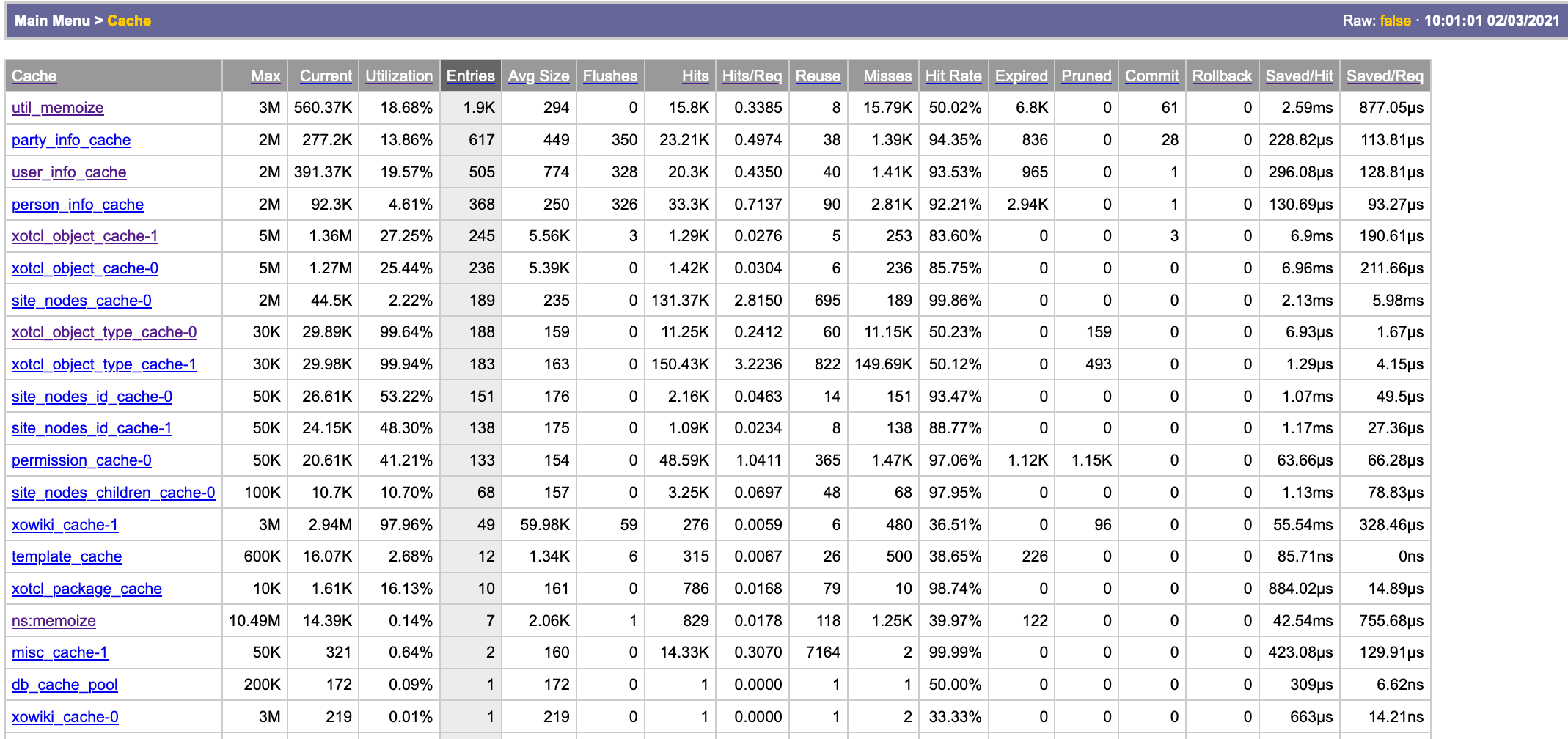
The nsstats module provides among many other things an overview of the used caches with various usage statistics.
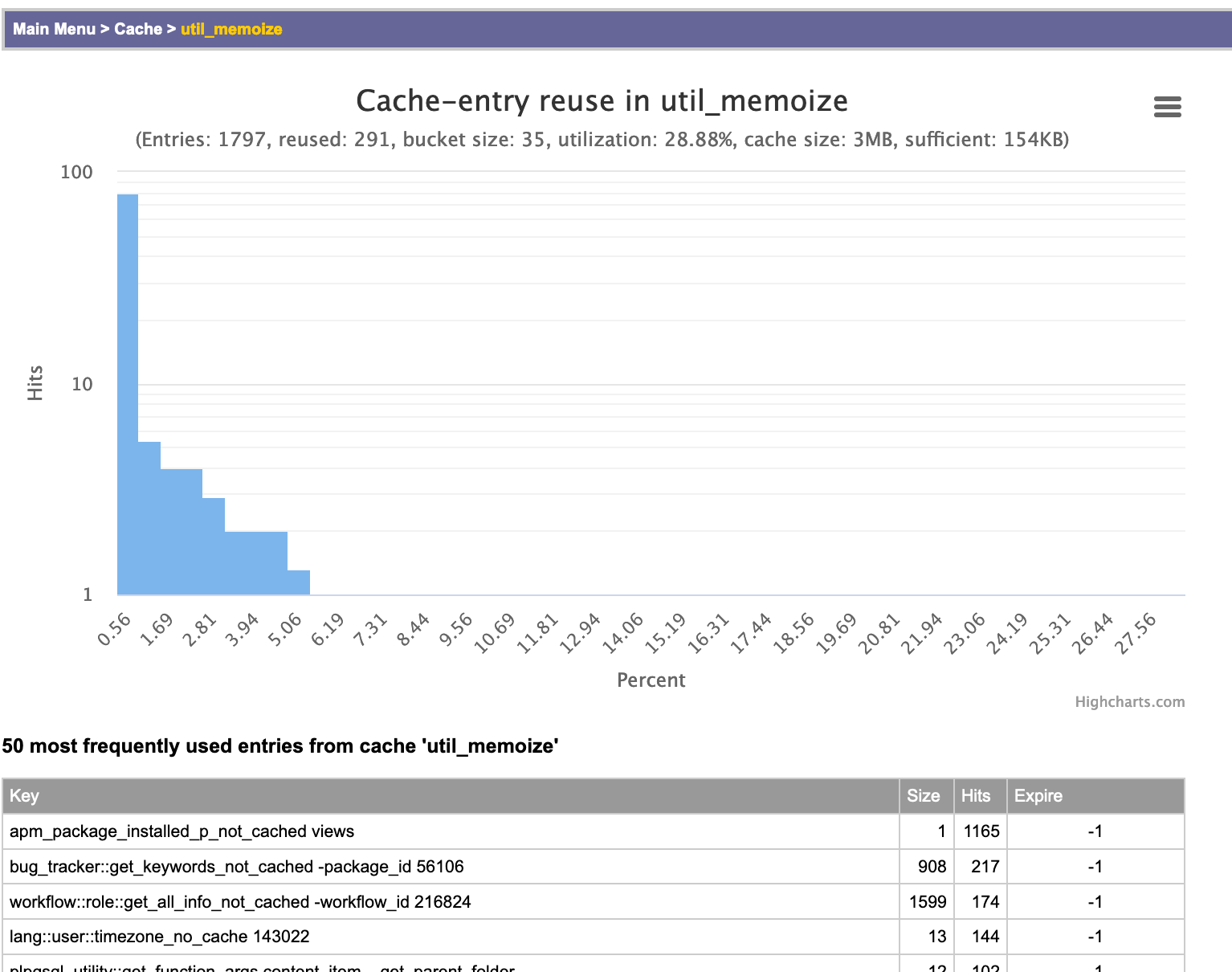
If one clicks on a single cache, a detail view is provided. The newest version of the detail view of a cache in nsstats contains now as well estimates for a good cache size. Useful cache entries are entries which were reused at least once. So, when a cache with 1MB size has e.g. a utilization of 50%, and only half of the used entries are reused, then effectively, the calculation suggests that 250KB + 10% are sufficient.
The only memory waste are actually the entries in the cache without any reuse, since the cache size is a max-size, the space which is not used does not cost memory.
The graphic shows, that only 5% of the size of the cache at openacs.org are actually useful, less than 2% has a reuse of 5 or better. Certainly, the reading are only useful after running the server for a while.
Another dimension for cache tuning is cache partitioning as supported in OpenACS 5.10, which is important for highly busy sites in case the cache lock times go up. More about this later.
Created by Gustaf Neumann, last modified by Gustaf Neumann 27 Aug 2020, at 07:46 PM
As of this writing (oacs-5-10), OpenACS supports CKEditor 4, which is kept as a separate package.
Per default, the CKEditor is used via CDN. If you prefer to install CKEditor locally, then go to /acs-admin/, click on the "Richtext CKeditor4" package on the link under site-wide admin. The pages show, how CKEditor is currently used, and offer a link for downloading and installing (gzipped, brotli if available).
Since upgrading to a newer version of CKEditor means often a different user experience.So, many site are reluctant to upgrade automatically to different versions. In these cases, one can configure the version of CKEditor in the NaviServer configuration file.
    ns_section ns/server/${server}/acs/richtext-ckeditor
           ns_param CKEditorVersion   4.14.1
           ns_param CKEditorPackage   standard
           ns_param CKFinderURL       /acs-content-repository/ckfinder
           ns_param StandardPlugins   uploadimage
A version specified in the configuration file override version numbers in the richtext package. When there is no such entry, then the version from the package is used.
Created by Gustaf Neumann, last modified by Gustaf Neumann 27 Aug 2020, at 11:47 AM
SQL logging is usually controlled via the configuration file of NaviServer. However, it can be as well activated at runtime via ds/shell by using the following commands:
- make sure to turn sql-debugging level on
- make sure, the logminduration is small enough (NaviServer allows to log only entries a threshold)
ns_logctl severity "Debug(sql)" on
foreach pool [ns_db pools] {ns_db logminduration $pool 0}
If you are interested e.g. in queries taking longer than 0.5 seconds, you can use
foreach pool [ns_db pools] {ns_db logminduration $pool 0.5}




