Showing 201 - 210 of 694 Postings (
summary)
Created by Lee Denison, last modified by Benjamin Brink 29 Jun 2017, at 03:19 AM
State of This Document
This proposal should be considered a rough draft as it has not yet been reviewed by any core team members. The response::* api has been renamed and moved to a separate proposal (templatehead).
Goals of this proposal, ie. why change site nodes?
I believe the changes in this proposal would:
- Allow more flexible use of the url space to facilitate a site wide approach to CMS type applications.
- Allow better and simpler integration for applications with a data driven url space (eg. wiki, form builder).
- Support better models of code reuse within OpenACS.
- Help relieve the burden on the overloaded concept of a subsite.
Suggested Changes
Abstractly, the changes I'm suggesting are:
- Allow site nodes to have multiple root nodes. Site nodes are currently constrained to be a single tree. Clearly the main site tree would need to be easily identifiable. This would allow applications to re-use the existing site_nodes datamodel to represent their own data driven url spaces. This would also allow different hostnames to correspond to different root nodes.
- Allow any object type to be mounted at a site node (the site nodes datamodel already allows any object type to be mounted but beyond a certain point the request processor assumes the mounted object is a package). Or put another way, the principal purpose of a site node would be to select a function to handle the request rather than a package object. The current control flow for handling packages would become a function invoked in this way.
- Allow parameters to be associated with site nodes. This would allow concept such as the DefaultMaster to be moved out of acs-subsite as well as allowing generic action code to be parameterised in a specific location.
- Already Implemented: Lazy Caching of site nodes. Site nodes are lazy cached, meaning they are loaded from the database once they are called / accessed for the first time instead of during startup. This considerably brings down the time needed for starting dotLRN.
I have implemented the above ideas in a copy of the site_nodes datamodel called 'locations'. Together with dynamic types I've used locations to create dynamic wizards and a data driven form builder which could be considered proofs of the concept.
Implementation Detail
Multiple Root Nodes
This can be achieved by treating site_nodes at depth 1 as root nodes; ie. the children of the current singleton root node would be root nodes in their own right.
The overall root site node is created during the kernel datamodel installation. The URL space for the main site, as we know it currently, would be created as a child of this root node with its root (at depth 1) being assigned an acs_magic_object. I propose the magic object be called 'default_site_root'. The root of the site nodes tree would therefore look something like this:
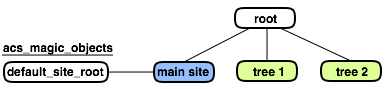
Despite the lack of a specific 'node_id' or 'url' option in some cases, the site_nodes::* api is designed to allow you to identify a site node by either its url or node_id. I would propose that functions which currently accept a node_id would carry out their function on the specified node regardless of which tree the node belongs to. Functions which accept a url parameter to identify the site_node would be given an optional 'root_id' switch which defaults to the 'default_site_root' magic object. The 'root_id' switch would allow you to look up a node by url in a different tree.
By default all hostnames are considered mapped to the 'default_site_root' node. In this proposal the host_node_map could be used to assign hostnames to alternate root nodes. Although I don't think their is enough support in the toolkit as a whole for templates/packages/objects which appear simultaneously at different paths below a hostname, this aspect of the host_node_map would continue to function as before.
Method Mapped URLs
Many MVC frameworks incorporate the idea of mapping handler functions (or controllers if you like) to urls - this much is pretty well understood. Exactly how a particular method should be selected for given URL may be a matter for debate. For example, some members of the core team have discussed with me the idea that the selection should be based in part on the data type of the object mounted on a site node. Personally, I would go for the simplest option: store the name of the function to call in the site node. I'll leave this part to be defined after there has been more discussion.
Site Node Parameters
These would be implemented using a fairly standard skinny tables approach similar to package parameters.
Impact On Existing Code
Currently I believe the code that would be affected by these changes amounts to:
- Site nodes api and caching code: would need to be updated to understand multiple root nodes. A small number of changes are required to remove assumptions of apm_packages.
- Site map admin pages: would need to be updated to understand that objects other than packages may be mounted.
- Any code which assumes only apm_packages are mounted on site nodes.
Created by Dave Bauer, last modified by Benjamin Brink 29 Jun 2017, at 03:10 AM
Currently (Wednesday, May 9, 2007) there are 228 open bugs in OpenACS and .LRN https://openacs.org/bugtracker/openacs/. (Note I had to multiple 25 time the number of full pages of bugs and tack on the last 3 on the last page the numbers next to the filters don't reflect the actual current state.) The list of bugs in the bugtracker does not reflect the reality of the release status of the toolkit. That is, the core developers and the automated tests show that OpenACS core and .LRN are pretty stable and work as expected.
There are some quite old bugs, along with suggestions, todos and more reported in the bugtracker. Its quite possible a bug was fixed without a developer noticing a reported bug in the bugtracker that should have been closed. Some bugs have become irrelevant due to changes in OpenACS since the bug was first reported.
Around OpenACS 5.1 there were even goals for number of open priority 1 bugs (0) before a release was declared final. I think it is a good goal to have the bugtracker reflect the real status of a release.
To do this we need volunteers to go through existing bugs, and check if they are still relevant, check for patches, and close the bug, fix it, or as for help in resolving a bug.
Here is a proposal for a procedure to meet this goal
- Test is a bug can be duplicated on the newest release of OpenACS 5.3.1 or .LRN 2.3.0. If not it should be marked not reproducible and closed. If more information is necessary that should be marked and the bug reassigned to the original submitter.
- If the bug is reproducible, and the tester does not feel they have the knowledge to fix the bug themselves, a request for assistance should be made. At this point a more experienced volunteer will need to help out. It would be wonderful, although it is not required, if volunteers ask for help, then take this advice to learn more about the toolkit, and try to fix it themselves. This is definitely NOT required to contribute to this effort. Anyone who can try to reproduce a bug on a test server can contribute.
- If a decision needs to be made, whether a bug should be fixed, for core packages, the OCT should decide. For .LRN packages that are released with .LRN, the .LRN Leadership Team should decide. For other packages, it would be great if someone who uses or develops with the package will step up as maintainer and make that decision.
This is meant as a quick simple proposal to get a discussion going, and hopefully a volunteer effort organized to make the bugtracker reflect the real status of the code. Any suggestions are welcome.
--
suggestions:
1. bug bash. Maybe coincide with a Tcl/Tk conference (for those not following the Tk part).
Created by Nick Carroll, last modified by Gustaf Neumann 28 Jun 2017, at 08:40 PM
Package Specification Summary for Package: acs-api-browser
| Summary: |
Interactive documentation for the Tcl and SQL APIs. |
| Description: |
On line interactive documentation for the locally installed Tcl and SQL APIs. Links to the Tcl core and NaviServer online documentation as well. |
| Maturity: |
Mature and Standard |
| This package depends on: |
acs-tcl acs-kernel |
| Packages that depend on acs-api-browser: |
acs-automated-testing xotcl-core |
| Package parameters: |
- FancySourceFormattingP
- Should we highlight syntax and hyperlink procedure names when showing procedure source code? (1 for yes, 0 for no) (default 1, type number, scope instance)
- ValidateCSRFP
- Boolean parameter to activate/deactivate CSRF protection for this package instance (default 1, type number, scope instance)
|
Bug Tracker Summary for Package: acs-api-browser
Code Metrics Summary for Package: acs-api-browser
| # Tcl Procs |
50 |
| # Tcl Lines |
2376 |
| # Tcl Blank Lines |
260 |
| # Tcl Comment Lines |
241 |
| # Automated Tests |
16 |
| # Stored Procedures |
PG: 0 ORA: 0 |
| # SQL Lines |
PG: 0 (blank 1 comments 0)
ORA: 0 (blank 1 comments 0) |
| # ADP pages |
14 |
| # ADP lines |
421 |
| # Include pages (acs-api-browser/lib/) |
1 |
| # Documentation pages |
0
|
| # Documentation lines |
0 |
| Browse Source |
API-browser |
| Github Repository: |
https://github.com/openacs/acs-api-browser/tree/oacs-5-10
|
Created by Benjamin Brink, last modified by Benjamin Brink 24 Jun 2017, at 08:09 AM
some text..
some text..
Created by OpenACS community, last modified by Benjamin Brink 24 Jun 2017, at 05:19 AM
The history of OpenACS documentation: ..began by building on a good documentation base from ArsDigita's ACS in the late 1990's. The ACS documentation was largely written in docbook. Some sections of the documentation, however, lacked details and examples; others simply did not exist. The OpenACS community began meeting the challenge by identifying needs and writing documentation on an as needed basis.
By having documentation dependent on volunteers and code developers, documentation updates lagged behind the evolving system software. As significant development changes were made to the system, existing documentation became dated, and its value significantly reduced. The valiant efforts that were made to keep the documentation current proved too difficult as changes to the system sometimes had far-reaching affects to pages throughout the documentation. System integration and optimization quickly rendered documentation obsolete for developers. The code became the substitute and source for documentation.
There are many thousands of lines of code, and few developers tracking changes and publishing the changes. Subsequently features and advances to the OpenACS system went unnoticed or were not well understood except by the code authors. Work was duplicated as a consequence of developers not realizing the significant work completed by others. New developers had to learn the system through experience with working with it and discussion in the forums. Informal sharing of experiential and tacit knowledge has become the OpenACS community's main method of sharing knowledge.
Around 2006, efforts were made to build a consensus in new ways to overcome existing documentation limitations. Like most any diverse community, a consensus could not be reached. Time has distilled efforts into three approaches that augment OpenACS' primary source of documentation: OpenACS code itself.
Created by Robert Taylor and Ryan Gallimore, last modified by Benjamin Brink 24 Jun 2017, at 04:21 AM
The managing of OpenACS documentation has evolved a few different ways. Instead of working on a unified consensus in managing the OpenACS documentation, there are primarily three efforts:
Approach 0: Continue updating docbook documentation via CVS (for those with access to CVS).
Approach 3: en:New_Documentation_Process is migrating the original OpenACS docbook docs to an xowiki instance.
Approach 4: en:Documentation_Project_Plan is building new documentation based on how the brain likes to chunk using subsystems.
See en:Documentation_Project_Discussion for current status.
Created by Avni Khatri, last modified by Gustaf Neumann 22 Jun 2017, at 09:44 AM
Administration
Steps to Cleanup (Zenify) a Package Page
- View Page in a browser and view source of page
- Check Doctype
- Check Title (optional)
- Check for H1-Hn and make sure they are in order. If not, make them so.
- Close all HTML tags
- Make sure there is no inline CSS
- Add an ALT attribute for IMG tags
- Add a TITLE attribute for A tags as necessary
- Check all user visible text and make sure it is using message keys instead of text
- If page has a form, make sure it is using formbuilder
- If page has data in tabular format, make sure it is using listbuilder
- Run accessibility tests
Doctype
- First target: Validated HTML 4.01 Strict
- Code:
<!DOCTYPE HTML PUBLIC "-//W3C//DTD HTML 4.01//EN" "http://www.w3.org/TR/html4/strict.dtd">
- Background: Choosing a DOCTYPE. Why not XHTML? See http://www.hixie.ch/advocacy/xhtml
Basic Page Requirements
- Title: should be in title tag, breadcrumbs, and h1 at top of page.
- To accomplish that, ADP pages using the <master> tag should pass the following properties.
<property name="title">Page Title</property>
<property name="context">{ { breadcrumb_url link_title } .. last_breadcrumb_element, title unless there is a good reason for it to be something else}</property>
You don't need to manually build the context bar UNLESS you want to include a URL that is not part of the site map. In other words, the context for 99% of pages should just be a one element list containing the page title or other text you want as the last element of the context bar. (DAVEB)
Title and context variables are set in the Tcl file so the property call looks like this
<property name="title">@title;literal@</property>
<property name="context">@context;literal@</property>
- Use message keys instead of text. https://openacs.org/doc/i18n-convert.html
Applying new CSS and HTML clean-up
Form Builder and Template
- All forms will use the default form template (standard.adp) now.
- Therefore, there is no longer a need to have the "style" attribute in the formtemplate tag. (i.e. <formtemplate id=zen style=inline>). We can get rid of this attribute on all forms that currently use it.
- Instead, there are different CSS classes that can be applied to all forms to get the same effect of inline.adp, plainest.adp, and other form templates while actually using the zen-ified standard.adp. The form class to be used is passed in the "html" parameter of the ad_form proc.
- Example:
- ad_form -name "zen" -method post -html {class vertical-form}..... -form {....}
- This will render: <form name="zen" method="post" class="vertical-form">
- List of form classes available and example URLs.
- Note: Example forms are checked into the 5.3 branch. Example files are listed below.
- margin-form : This is the default form class if none is passed to the ad_form proc
- /packages/theme-zen/doc/forms/index*
- vertical-form
- /packages/theme-zen/doc/forms/form-vertical*
- inline-form : Replaces inline.adp
- /packages/theme-zen/doc/forms/form-inline*
- Example:
- Change:
- <formtemplate id=zen style=inline>
- To:
- <formtemplate id=zen>
- And modify the tcl ad_form call to pass a class to the form, so it will be like this:
- ad_form -name "zen" ... -html {... class inline-form}.... -form {...}
- If the form you working on started out as <formtemplate id="zen">, then you probably don't need to change the formtemplate or the form class. The defaults will most likely work fine. Look at the page in a browser and see how it is rendered. If you have any questions about which formtemplate to use, ask Mark Wylie.
- Fieldsets and Fieldset Legends
- Legends need to be short, there is no line wrapping for legends
- more fieldset and legend info coming soon
- If you have to hand code a form, it should look something like this:
<form class="margin-form">
 <fieldset>
  <legend>Short Legend</legend>
  <div class="form-item-wrapper">
   <div class="form-label">
    <label for="first_name">First Name</label>
     <div class="form-required-mark">(required)</div>
   </div>
   <div class="form-widget">
    <input type="text" name="first_name" id="first_name" size="30" />
   </div>
   <div class="form-help-text">
    <img src="images/icons/info.png" alt="info" width="16" height="16" /> Some info text
   </div>
   <div class="form-error">
    <img src="images/icons/exclamation.png" alt="error" width="16" height="16" /> This field was in error
   </div>
  </div>
  <div class="form-button">
   <input type="submit" name="formbutton:submit" value="submit" />
  </div>
 </fieldset>
</form>
Using sections in ad_form
The "section" element property is not longer supported. See Web_Forms for an example of how to use sections in ad-form.
List Builder and Template
When creating a list template that contains links, provide a title attribute (with a meaningful and localized text) for each of them (checkpoint 13.1 - priority 2 - AA). Example:
template::list::create \
    -name messages \
    -html [list summary "Summary title"] \
    -caption "Optional caption" \
    -multirow messages \
    -page_size $page_size \
    -page_query_name messages_select_paginate \
    -pass_properties { moderate_p } \
    -actions $actions \
    -elements {
        subject {
            label "[_ forums.Subject]"
            link_url_col message_url
            link_html {title "[_ forums.goto_thread_subject]" class "myclass"}
        }
    }
This is also true for actions list. Example:
lappend actions [_ forums.Post_a_New_Message]\
	[export_vars -base "${base_url}message-post" { forum_id }]\
	[_ forums.Post_a_New_Message]
New Parameters
- caption - optional
- summary - required for AA. There is a default in place: "Data for %list_name%"
W3C Web Content Accessibility Checkpoints
Zen aims at being Level AA compliant (priority 2 checkpoints):
Tools for Checking Accessibility
Accessibility Evaluation Toolbar (Firefox):
- Disable javascript: alternatives should be provided to js actions
- Disable styles (CSS): to verify the render for text only browsers
- Disable images: ALT texts should appear for each image
- Display title attribute: a meaningful title should be provided for each link
- Linearize page: tables should linearize well
- Validate local HTML
- Validate local CSS
- Validate local accessibility
- Validate package and inline (if you're using the new inline class) CSS.
Colour Contrast Analyser ( Firefox):
- Use the "Luminosity Contrast Ratio" option.
- For the default CSS, the page should pass at level 2
- For the HC (High Contrast) CSS, the page should pass at level 3
Fangs, the Screen Reader Emulator (Firefox)
Hera (automatic and manual reports)
WebXact (if HERA is not working)
Others tips
- Use Opera's View/Small Screen mode to test the handheld.css.
Important Checkpoints
- WCAG - Checkpoint 3.5: Use header elements to convey document structure
and use them according to specification.
- WCAG - Checkpoint 5.3: Do not use tables for layout unless the table makes sense when linearized. Otherwise, if the table does not make sense, provide an alternative equivalent. Documents with two columns or more use tables to give structure. Layers should be used, instead.
Created by Olga C. Santos, last modified by Gustaf Neumann 22 Jun 2017, at 09:22 AM
Overview
Current SCORM support is provided by the LORS package: .LRN to incorporate IMS Metadata (IMS-MD 1.2.1) and IMS Content Packaging (IMS-CP 1.1.4) specifications as well as ADL SCORM extensions (SCORM 1.2). See Educational_Standards.
Standards Support.
Contributors:
- It was initially developed by Ernie Ghiglione
- E-LANE project
- Adam Ullman added the SCORM applet for the run time interface from Concurrent Technologies
- SITT (Michelle y Giancarlo) added delivery-scorm to collect the scores in the database
- Dave Bauer
Extensions:
LORS Central: version handling, live version management, single item add/edit, others. Uses Content Repository directly, instead of file-storage
Status:
- Incompatibilities between the java server and client environments
- LORSM: Emma and Don are doing bug-fixing
- LORS central: Galileo is doing bug-fixing. It clones LORSM, so improvemnts in LORSM have to be integrated
Community members interests:
- Matthew Coupe: Requires SCORM support to run SCORM courses. LORS central will be a nice to have feature as will integration with assessments, forums and chat.
- aDeNu Group (UNED) requires SCORM support to run accessible SCORM based courses for ALPE project
- Innova Group (UNED) is migrating LORS to Oracle to provide SCORM support in aLF (UNED customization of dotLRN)
- Galileo wants to deploy LORS Central
- Don Baccus needs basic course sequencing for a current client project
TO DO:
See SCORM Roadmap presented at the Workshop on Educational Standards and Methodologies support in dotLRN at OpenACS and .LRN Spring Conference, Vienna 2007.
Short term:
- Fix bugs both in LORSM and LORS Central
- Assure that SCORM sessions are recorded
- Dynamic integration of Forums and File storage (as Assessment is done)
Medium term:
- Combine LORSM and LORS Central to include version handling, live version management, single item add/edit, content repository instead of file-storage, but keeping their different scopes: LORS central handles very well centralized management, although it could do in a per course basis as LORSM does, which is for course level management
- Maintain both probably is not a good approach, LORS Central provides what LORSM does, but Central has features such as: 1) item online add/edit, 2) single place to deploy one course and its versioning among different class instances, 3) native content-repository support (not using file-storage). Note that 1) & 2) are needs for real world deployment of courses.
- Improve implementation: recompile Java applet vs. rewrite in JavaScript
- Integrate LORS inside platform space (instead of in full page display)
- Integrate portlets (forums, assessment, file storage) instead of the whole page
- Improve accessibility
- Implement SCORM 2004 v3
Competitors:
- SCORM 1.2: ATutor, ANGEL, Kewl, OLAT, Docebo, WebCT
- SCORM 1.3: Blackboard, Claroline, Desire2Learn, TeleTop, Moodle
See eduTools for a comparative comparison.
An appropriate SCORM support is a MUST for dotLRN to be competitive.
Last modified: 2017-06-22 09:22:57.800008+02
Created by Rocael Hernández Rizzardini, last modified by Gustaf Neumann 20 Jun 2017, at 10:34 AM
Description
The Content Package aims to be a simple tool for content creation in the educational context.
- Provides a simple interface to create web pages (a no-brainer 1 click), and easily include and manipulate web assets such as flash, videos, images, etc.
- Provides a web template, easy to manage, similar to a PPT template but with built in navigation (sequential navigation, tab based organization, sub tabs supported and per unit / module navigation).
- Folder, subfolders, pages ordering.
- Free of "standards" approaches, so professors with basic word knowledge can use it.
- Auto scroll (focus navigation on the content area).
- It provides portlets for .LRN
The Content Package is based in XOWiki, since it is a very well maintained tool, and have many of the desired features such as: easy content tool (plus the advantage that a wiki tools is becoming more and more common), directories, versioning, flexible built-in features to handle content more easily (including positioning and segmentation), basic template management, variables, multi-language support.
The Content Package is a configuration package with a set of scripts, xowiki is left unmodified for Content to work.
Check Galileo University promotional video (in Spanish).
Application architecture design by Byron & Rocael, development by Byron for Galileo University.
Try it at:
http://www.galileo.edu/dotlrn/classes/departamentoparapruebas/departamentoparapruebas.actualizacintributaria/lamegaprueba2/xowiki/
user & pass: usertest
Check the manuals (in Spanish).
To-Do
- Provide collaborative content creation tools while being able to set up roles easily.
- Integrate to SCORM / LORS
How to install
Works on:
postgresql 8.2.4
xowiki 0.47 +
xotcl 0.47 +
Requirements:
ltree module for PostgreSQL.
Installation Process:
- Install ltree module for postgres.
- Obtain packages: content-portlet, dotlrn-content, xowiki,xotcl-core
- Move the files of content-portlet/misc/www/* to xowiki/www/
- Move the files of content-portlet/misc/admin/* to xowiki/www/admin
- Move the files of content-portlet/misc/portlets/* to xowiki/www/portlets/
- Go to acs-admin/apm
- Choose "install-packages"
- Install xotcl-core, xowiki , content-portlet, dotlrn-content
- If xowiki is already installed, reload xowiki
- Restart the server.
- Activate the applet in one course.
Technical Specs
Install the content applet in dotlrn will:
- Place the xowiki (INSTANCIA) that will be used with the following personalized characteristics.
- extra_css : /resources/content-portlet/template/Gestheme.css
- security_policy: ::xowiki::policyb
- template_file: ges-view
- ::xowiki::Page : Index for welcoming to the main application: content-portlet/www/prototypes/gestemplate/GesTemplateIndex.page
- Default object whit the name folder_id in which the use of Xhina editor is configured.
- es:o_index : Object which manages the presentation of the index page depending on the kind of user.
Source: content-portlet/www/prototypes/gestemplate/GesTemplateIndexe.page
- es:Template_de_ges Web template that manages the presentation and navegation of the future content pages that will be created.
Source: content-portlet/www/prototypes/gestemplate/GesTemplatebody.page
- es:Template_de_header: Template which manages the edition of the content titles.
source: content-portlet/www/prototypes/gestemplate/GesTemplateheader.page
- es:header_page : used to entry the heading of the future content pages.
Source : content-portlet/www/prototypes/gestemplate/GesTemplateheaderpage.page
- Creation of the content index that will be used: this content index is composed of the following categories:
- Introduction
- Content
- Activities
- Glossary
- Appendix
Content-Portlet Description:
The template es:Template_de_ges manages the final presentation of the created content pages.
The web template used, is based in three navigation levels.
This template is built with a series of scripts, which are responsible of the navigation of every section, is divided in: header, module navigation, section navigation, subsections navigation, navigation between pages and content.
The navigation is controlled by their respectives scripts located in content-portlet/www/
And they are:
unit-navbar: Checks the navigation between units or modules.
Navbar and complete-navbar: Checks the navigation between sections in the web template.
complete-titlebar, next, home: These are the elements that conform and check the horizontal navigation bar between content pages for one section or subsection.
Subnavbar and complete-subnavbar: These elements check the navigation between subsections.
Each one of these are part of the web template and provides us a graphic simple way to navigate between content pages.
content-portlet/www/prototypes/gestemplate : Provides the content of the diferents pages of xowiki created automatically by adding the applet in a course.
content-portlet/www/resources : It contains the graphic part of the web template that is being used. (images, estiles, etc.)
Updates
There is an improved version of this package called Learning Content.
Created by Gustaf Neumann, last modified by Gustaf Neumann 20 Jun 2017, at 10:18 AM
Package developed by Victor Guerra to collect IRC data in wiki pages, running on OpenACS.org




